Facebook
Yealink WH66 Dual/Mono Workstation DECT Wireless Headset

Yealink WH66 Dual/Mono Workstation DECT Wireless Headset

Elevate Your Communication Game with the Yealink WH66 DECT Wireless Headset

In today’s fast-paced business world, effective communication is crucial for success. Whether you’re collaborating with colleagues, engaging with clients, or participating in virtual meetings, having a reliable and comfortable communication tool is essential. That’s where the Yealink WH66 DECT wireless headset shines as your ultimate all-in-one solution.

WH66 Features

Yealink WH66Comfort Redefined

Say goodbye to discomfort during long calls. The Yealink WH66 is designed with user comfort as a top priority.

  • Lightweight build, four wearing styles, and various sized ear tips ensure a perfect fit for everyone.
  • Soft leather ear cushions and breathable design provide comfort during extended usage.
  • 330 degree adjustable microphone for crystal-clear conversations.

Unparalleled Wireless Freedom

Experience the freedom to move around without being tethered to your desk. The WH66 offers

  • Impressive wireless range of up to 120 meters for freedom to move around.
  • Up to 8 hours of talk time for all-day productivity.
  • High-density installation support for up to 200 users simultaneously in Europe.

Streamlined Device Management

Managing multiple USB devices has never been easier.

  • Yealink USB Connect platform for effortless handling of multiple Yealink USB devices.
  • Convenient settings adjustment for a personalised experience.

Seamless Platform Integration

Compatibility across various UC platforms is crucial for streamlined communication. The Yealink WH66 has broad compatibility across various UC platforms ensuring consistent call quality
  • Compatible with Microsoft Teams, Google, Zoom, Avaya, and more!
  • A dedicated Microsoft Teams button for one-touch access to your Teams application, enhancing your collaboration experience.

Flexibility at Its Best

Experience versatility like never before!
  • Optional Portable Accessory Kit transforms the WH6X wireless office headset into a portable device.
  • Simple and flexible solution for professionals on the move without compromising communication quality.

Embrace the Power of Yealink WH66

Elevate your communication game with the Yealink WH66 DECT wireless headset. Its combination of comfort, freedom, and convenience makes it a must-have communication tool for businesses of all sizes. Stay focused, connected, and productive throughout your workday with this powerful all-in-one communication solution.

Send Us A Message

Interested in driving growth? Have a general question? We're just an email away.

"*" indicates required fields

Mailing List Consent
Stay up-to-date with the latest news, promotions, and tech advice from KeyTech through our monthly email.
Navigating the Future of Work: Mobility with Webex in Hybrid Environments

Navigating the Future of Work: Mobility with Webex in Hybrid Environments

Hybrid working has emerged as a transformative paradigm for businesses and organisations, ushering in a new era beyond the confines of traditional office spaces. This novel approach to work is redefining the way we operate!

Harnessing the Power of the Cloud for Seamless Communication

In the dynamic landscape of modern workplaces, the demand for dependable communication technologies has never been greater. These technologies are the linchpin of effective collaboration, irrespective of whether your team is on-site or operating remotely.

Enter Webex, a game-changing platform that leverages the cloud to facilitate virtual meetings effortlessly, regardless of your device or location. It is the perfect solution to maintain operational efficiency in a world where workplaces are constantly evolving!

Let’s delve into what sets this tool apart and makes it ideally suited for the hybrid work environment.

Unmatched Flexibility & Mobile Accessibility

  • Webex can be installed and used on any device – PC, Mac, iOS and Android tablets and smartphones!
  • Make and receive business calls and messages using your business phone number via the Webex mobile app!
  • Work with your team from any location.
  • Access the same tools and resources from any device no matter where you are working.

Embracing VoIP & Wi-Fi Calling

  • Be connected from anywhere that a mobile device is connected to the internet.
  • Mobile accessibility ensures teams can collaborate on the go, without having to be tied to their desks.
  • Make and receive calls using VoIP or Wi-Fi while roaming to avoid high roaming charges.

Unwavering Security

  • Webex delivers robust security features that protect your data to ensure your conversations remain private. With features like end-to-end encryption, password protection, and data encryption, Webex ensures that your data is safe and secure.

Seamless Video & Audio Conferencing

  • Webex provides high-quality video and audio conferencing capabilities that are essential for hybrid teams.
  • With features like virtual backgrounds, screen sharing, and real-time whiteboarding, it is so easy to collaborate effectively, no matter the location.

Integration with Productivity Tools

  • Webex can integrate with other tools such as Microsoft Teams making it easy for collaborators to access the resources required to work effectively. For example, Microsoft Teams users are able to access Microsoft files, calendars, and emails without having to switch between Webex and Teams platforms.

An Ever-Growing Arsenal of Features

  • Webex is in a constant state of evolution, driven by user feedback. As a result, it offers an extensive and ever-expanding list of messaging, call, and meeting functions waiting to be explored. To truly grasp the incredible capabilities of this versatile tool, we encourage you to request a demonstration and witness its power firsthand. Experience the future of hybrid work with Webex!

Request a demonstration of this incredibly versatile tool so you can see its powerful capabilities for yourself.

Request a Call Back

  • This field is for validation purposes and should be left unchanged.
  • Stay up-to-date with our latest news, promotions, and tech advice from KeyTech through our monthly email.

M365 Collaboration Capabilities with AI

M365 Collaboration Capabilities with AI

Harnessing the power of artificial intelligence (AI) alongside Microsoft 365 (M365) can revolutionise productivity and efficiency. With the recent introduction of Copilot, an AI-powered assistant, the possibilities for streamlining workflows and enhancing collaboration are endless. Let’s explore how AI and M365 is transforming the way we work:

Collaborative Document Creation

M365 offers a suite of powerful tools, including Microsoft Word, Excel, PowerPoint, and more. AI capabilities embedded within these applications enhance collaboration and productivity. For example, AI-powered grammar and style suggestions in Microsoft Word ensure that written content is polished and professional. Smart data analysis in Excel allows for quick insights and recommendations. And intelligent design suggestions in PowerPoint help create visually appealing presentations.

Enhanced Communication and Collaboration

M365’s collaboration tools, such as Microsoft Teams, combined with AI capabilities, further enhance communication and teamwork. AI-powered features like real-time language translation, smart meeting scheduling, and automated transcription of meetings help overcome language barriers and improve collaboration among global teams. Additionally, intelligent content recommendations and search capabilities within Microsoft SharePoint and OneDrive facilitate efficient information sharing and retrieval.
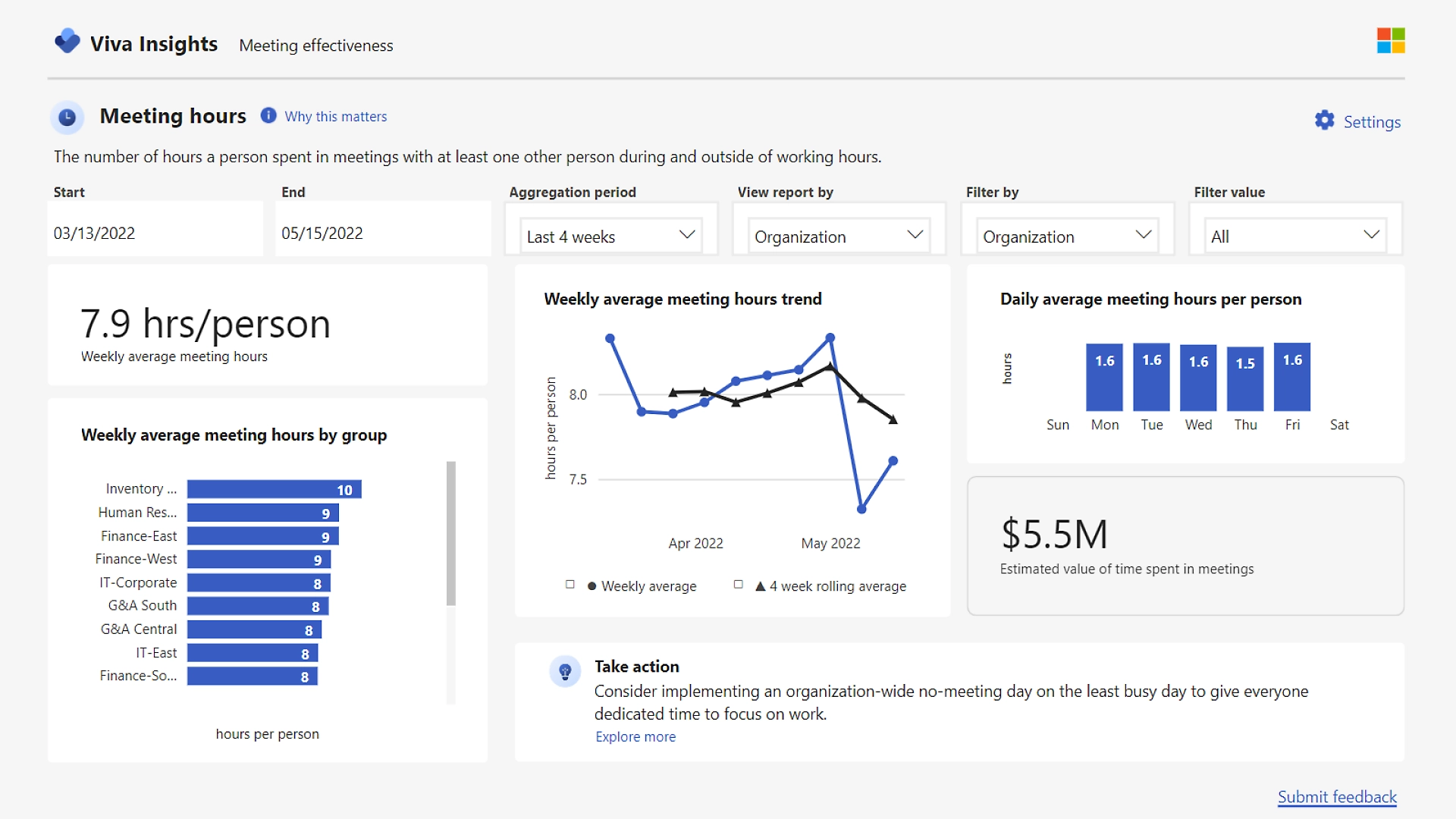
Blade003_GuidedTour analytics-screenshot

Data Insights and Analysis

M365’s integration with AI technologies enables users to unlock valuable insights from their data. With Microsoft Power BI, for instance, AI algorithms can identify patterns, detect anomalies, and make predictions, allowing businesses to make data-driven decisions. Whether it’s sales forecasts, customer behaviour analysis, or operational optimisation, AI-infused data analysis tools in M365 empower organisations to drive efficiency and stay ahead in today’s competitive landscape.

Personalised Productivity

AI in M365 can intelligently adapt to individual users’ preferences and work patterns, boosting personal productivity. For instance, Microsoft Outlook’s AI-driven email prioritisation helps users focus on important messages and automate repetitive tasks. Cortana, Microsoft’s virtual assistant, can provide personalised reminders, schedule management, and even anticipate user needs based on previous interactions.

Efficient Coding Assistance & Quality Improvement

Copilot, developed by OpenAI in collaboration with Microsoft, is designed to assist developers by debugging and generating code suggestions as they write. By leveraging machine learning models trained on vast amounts of publicly available code, Copilot can provide contextually relevant code suggestions, improving coding speed and accuracy. With Copilot integrated into M365, developers can save time and focus on high-level problem-solving instead of repetitive coding tasks.

Security and Privacy

Microsoft is committed to ensuring the security and privacy of user data when utilising AI technologies like Copilot. Copilot follows strict security protocols and adheres to privacy regulations to protect sensitive information. User feedback is anonymised to maintain privacy and by using Bing Chat Enterprise, commercial users can harness the benefits of AI with peace of mind that user and business data is protected.

Like this post?

If you liked this post, sign up to our newsletter to keep informed on other news.
tech improvements to boost your business

Want to subscribe to our Newsletter?


Yealink BH71 Mono Bluetooth Headset Series

Yealink BH71 Mono Bluetooth Headset Series

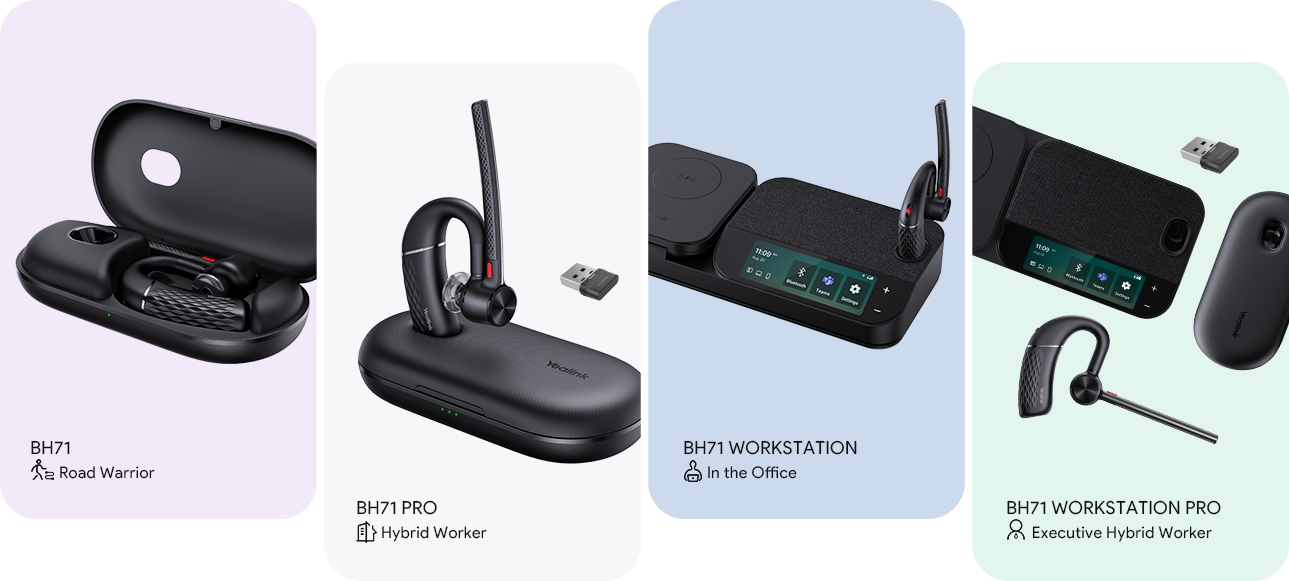
Whether you’re constantly on the move, a hybrid worker, an executive professional, or stationed in the office, there is a Yealink BH71 Mono Bluetooth series headset designed to meet your unique needs.

  • Connections: Bluetooth + 2x USB (phone/ PC)
  • Wireless Charging
  • 3x USB Hubs
  • Cancels out 90% of Background Noise
  • 100 feet/30m Wireless Range *Device & network-dependent
BH71 Series, choose the best headset for your needs
  • Portable and weighs less than 100g
  • 30 Hours of Talking Time
  • Comfortable, feels like nothing in your ear, adjustable ear hook
  • Compatible with typical calling apps, platforms and operating systems. (Zoom, Teams, Avaya, Google, 3CX, etc)

Send Us A Message

Interested in driving growth? Have a general question? We're just an email away.

"*" indicates required fields

Mailing List Consent
Stay up-to-date with the latest news, promotions, and tech advice from KeyTech through our monthly email.
Product: Yealink MeetingBoard

Product: Yealink MeetingBoard

Yealink MeetingBoard

  • All-in-One Design
  • 65-inch LED Touch Screen
  • Rich 4K visual presentation & navigation
  • Equipped with Android 10
  • Smart Collaboration Whiteboard with native Teams experience
  • Microsoft Teams whiteboarding is a cloud application that could allow everyone to join and collaborate at any place
  • Built-in 4K Camera
  • Optional PTZ Camera
  • 16 MEMS MIC Array
  • 4+2 Stereo SPK Array
  • All Noise Cancellation
  • Smart inking – Four-level input smart digital ink recognition feature supported on the
    touch – writing with pen tip, navigating with fingers, erasing with pen tail and the palm rejection.
  • Multi-inking simultaneously also supports multiple people collaborating simultaneously.
C

Watch the video

See the Yealink MeetingBoard in action!

Like this post?

If you liked this post, sign up to our newsletter to keep informed on other news.

Request a Call Back

  • This field is for validation purposes and should be left unchanged.
  • Stay up-to-date with our latest news, promotions, and tech advice from KeyTech through our monthly email.


Annual Telco Embargo 2022-23

Annual Telco Embargo 2022-23

End of year is coming, and with it comes the Telco Embargo

As we approach the end of the year, we also approach a period where major Telcos including Telstra, Optus and NBN restrict or stop certain types of services over the holiday season.

Embargo dates for 2022 -23

December 14, 2022, to January 16, 2023

This information is especially important if you’re thinking of relocating offices so you can get organised early and contact us well in advance to ensure new phone lines get installed before the embargo period. With that in mind, we have created this page with all the information you need to know for the Telco Embargo this summer.

What does the embargo mean for my business?

Major telcos such as Telstra limit or cease certain services annually during the embargo period. Services that will be impacted during the embargo period are:

Internet Services

Fibre, NBN, or other broadband internet connections, cabling and connectivity.

Network Services

Relocations, reconfigurations, hardware or software upgrades; Adds, Moves and Changes to fixed lines.

Voice Services

Provisioning of new hosted phones systems / VoIP, new numbers and porting of numbers from one carrier to another.

laughing Services that will continue during the Embargo Period

Faults and mobile support services will continue as usual during the embargo period.

Faults

Fault restoration activity is exempt from the network embargo period and can be lodged as normal with service providers.

Mobile Services

There is no embargo period for Mobile Services however delivery of some products may take longer than usual.
Typical mobile services which continue throughout the holiday period are:

  • activating SIM cards
  • connecting a new mobile service
  • disconnecting a mobile service
  • mobile plan changes
  • transferring ownership of a service
  • investigating billing issues and credit management

Support

Most carriers provide a level of support during the telecommunications embargo window, however, they may be unable to action some requests immediately, and response times may vary from company to company.

How do I avoid business interruption?

If you’re relocating offices, ensure you plan ahead to connect any new phone lines, and set up any new networks before the deadline (between December 14, 2022 and January 16, 2023).

Please contact Key Technologies as early as possible to arrange new phone lines and networks and prevent any urgency during this busy season.

Will KeyTech support services be affected?

KeyTech will be business as usual during the embargo period but are bound to experience delays with the abovementioned Telstra services. 

During the holiday period, KeyTech will be operating with reduced staff, however, we will endeavour to address any technical issues in a timely manner.

Call us on: 1300 755 615
Or email us: info@keytech.au

Merry Christmas From everyone at Key Technologies

Request a Call Back

  • This field is for validation purposes and should be left unchanged.
  • Stay up-to-date with our latest news, promotions, and tech advice from KeyTech through our monthly email.