
Facebook
Mobile Device & App Management

Mobile Device & App Management

Empowering Efficient Workflows On & Off-Site

In today’s business landscape, where mobility is increasingly important, Mobile Device Management (MDM) and Mobile Application Management (MAM) solutions have become indispensable tools for businesses of all sizes.

MDM and MAM offer comprehensive security strategies, enabling businesses to effectively manage and secure their mobile devices and applications. They also provide numerous benefits, including enhanced productivity, increased control, improved cost savings, and a seamless user experience.

In this post, we will explore why MDM and MAM are crucial for businesses and how they can help businesses achieve their objectives.

What is MDM and MAM and how do they differ?

Mobile Device Management (MDM) involves managing and securing mobile devices, such as smartphones, tablets, and laptops, across a business. It allows businesses to remotely manage and configure devices, enforce security policies, and ensure compliance with corporate standards. MDM solutions typically include features such as device inventory and tracking, remote wiping of devices, and the ability to enforce password policies.

On the other hand, Mobile Application Management (MAM) focuses on managing and securing mobile applications used by employees in the business. MAM solutions provide IT departments with the ability to control and manage the access, distribution, and security of enterprise mobile applications. MAM solutions often include features such as app wrapping, which involves adding a layer of security around an application to protect it from unauthorised access or data leakage, and app management, which allows businesses to distribute and manage apps across a range of devices.

The main difference between MDM and MAM is that MDM focuses on managing the devices themselves, while MAM focuses on managing the applications that run on those devices. However, both MDM and MAM are important components of a comprehensive mobile management strategy and can be used together to provide a holistic approach to mobile security and management.

How can MDM & MAM help businesses?

MDM solutions enhance a business’s security measures by allowing them to effectively manage and secure their mobile devices. This can include remotely wiping data from lost or stolen devices, setting up security policies to protect sensitive data, and preventing unauthorised access to company resources. MDM solutions can also simplify device management by providing a centralised console for managing mobile devices, which can help IT teams deploy updates and software remotely, saving time and resources.

MDM enables employees to work from anywhere and anytime, which can increase productivity and allow employees to be more responsive to their customers’ needs. Additionally, MDM solutions can help businesses save money by automating device and application management tasks, freeing up resources to focus on other critical business tasks. Finally, MDM solutions can ensure compliance with industry regulations and policies governing the use of mobile devices, providing businesses with peace of mind while avoiding costly penalties for non-compliance.

By implementing a MAM solution, businesses can benefit from streamlined application management and improved productivity. These solutions provide IT teams with a console for deploying, configuring, and updating applications on employee devices. A MAM solution secures access to company data at an application level with its built-in robust mobile security protocols protecting against potential breaches. MAM is a key tool for any business looking to enhance workplace efficiency without compromising company resources!

MDM and MAM solutions are essential tools for businesses that rely heavily on mobile devices and applications. These solutions offer numerous benefits, including reducing the risk of errors and downtime, providing employees the flexibility to access their work remotely, enhanced security and increased control, improved productivity, and cost savings. By adopting MDM and MAM solutions, businesses can focus on what matters most – their business.

Like this post?

If you liked this post, sign up to our newsletter to keep informed on other news.

Do you have a question about MDM/MAM?

Understanding Your Cybersecurity Score: Why It Matters and How to Improve It

Understanding Your Cybersecurity Score: Why It Matters and How to Improve It

If you’re running a business, it’s important to be aware of your cybersecurity score. This score measures how well your business is protected against cyber threats and attacks. A low cybersecurity score can leave your business vulnerable to data breaches, hacking, and other malicious activities that can have serious consequences for your operations, finances, and reputation.

Cybercriminals are constantly finding new ways to exploit vulnerabilities in networks, devices, and software, which can have serious consequences for businesses of all sizes. One way to assess your business’s readiness to withstand these threats is to calculate your cybersecurity score.

What is a Cybersecurity Score?

A cybersecurity score is a measure of your business’s security posture. It considers various factors, such as your network configuration, software patching, password policies, and employee training, to provide an overall assessment of your security readiness. The score is typically expressed as a numerical value, which can range from 0 to 100, with higher scores indicating stronger security.

Why does it matter?

A cybersecurity score can help you understand how well you are protecting your business from cyber threats. It can also give you a benchmark for comparison against other businesses in your industry or size category. Additionally, some customers and partners may require you to provide a cybersecurity score as part of their due diligence process, so having a good score can help you win new business.

How to improve your cybersecurity score?

Improving your cybersecurity score requires a comprehensive approach that addresses all aspects of your security posture. Here are some steps you can take to improve your score:

Conduct a security audit

A security audit can help you identify weaknesses in your network, devices, and software. You can then use the audit results to develop a prioritised plan for remediation.

Implement security best practices

There are many best practices you can follow to improve your security, such as using strong passwords, implementing multi-factor authentication, encrypting sensitive data, and restricting access to critical systems.

Invest in security tools and services

There are many security tools and services available that can help you detect and respond to threats, such as firewalls, antivirus software, intrusion detection systems, and data management systems. It’s essential to ensure that any software your business uses is properly licensed and updated to maintain its security and effectiveness.

Train your employees

Your employees play a critical role in your security posture, so it’s important to train them on how to identify and avoid common cyber threats, such as phishing and social engineering attacks.

Regularly monitor and update your security practices

Cyber threats are constantly evolving, so it’s important to monitor your security posture regularly and update your security measures as needed.

A cybersecurity score is an important tool for assessing your business’s security posture and identifying areas for improvement. By following best practices, investing in security tools and services, training your employees, and regularly monitoring and updating your security, you can improve your score and better protect your business from cyber threats. Don’t wait until it’s too late – take action now to improve your cybersecurity score and safeguard your operations, customers, and reputation.

Keytech logo icon

At KeyTech, we are committed to helping our customers enhance their cyber security posture by offering a range of comprehensive solutions and expert guidance. Our IT audit service is specifically designed to evaluate your cyber security posture, pinpoint any potential vulnerabilities, and create a tailored plan to implement effective solutions that enhance your security. With our expertise, you can be assured that your business will be better equipped to protect itself from cyber threats and safeguard your valuable data.

Book an IT Audit

Let's explore your business' security requirements together. Complete the form below to arrange your complimentary consultation and receive a quotation for our premium business data security & productivity solutions. With us on board, you can rest assured that your business is in good hands.

  • This field is for validation purposes and should be left unchanged.
Why Small Businesses Need IT Support: The Benefits of Outsourcing

Why Small Businesses Need IT Support: The Benefits of Outsourcing

In today’s digital age, technology is a critical component of any business’s success. Small businesses, in particular, need to have reliable IT support to ensure smooth operations and minimise downtime. However, many small business owners may not have the resources or expertise to manage their IT needs in-house. That’s where outsourcing IT support can come in handy. In this blog post, we will explore the benefits of having IT support for small businesses.

Access to Expertise

Hiring an IT support team provides small businesses with access to a team of experts who have extensive knowledge of the latest technology trends, software, and hardware. IT support providers have the necessary skills and experience to identify and resolve complex IT issues quickly, minimising downtime and improving productivity.

Cost-Effective Outsourcing

IT support can be a cost-effective solution for small businesses that don’t have the resources to hire a full-time IT team. With IT support services, small businesses only pay for the services they need, whether it’s regular maintenance, troubleshooting, or upgrading software and hardware.

Increased Security

Small businesses are increasingly becoming targets of cyber-attacks. IT support providers can help ensure that a business’s network and data are secure from external threats such as malware and hackers. They can implement security protocols, regular data backups, and disaster recovery plans, reducing the risk of data loss or breaches.

Improved Efficiency

IT support providers can help small businesses streamline their operations, automate tasks, and implement innovative technologies. This can help businesses save time, reduce errors, and increase efficiency, resulting in higher productivity and profitability.

Focus on Core Business Activities

Outsourcing IT support can allow small business owners to focus on their core business activities, such as sales and marketing, without worrying about the technical aspects of running a business. IT support providers can take care of all the technical details, freeing up time and resources for business owners to focus on what they do best.

In conclusion, having IT support is essential for small businesses that want to thrive in today’s digital age. With access to expertise, cost-effective solutions, increased security, improved efficiency, and the ability to focus on core business activities, outsourcing IT support can provide small businesses with the resources they need to succeed. If you are a small business owner looking for reliable IT support, consider outsourcing your IT needs to a trusted provider.

Get your time back and focus on growing your business with our reliable IT support. Fill out the form below to schedule a free consultation with one of our experts. During the consultation, we’ll discuss your business’s unique IT needs and provide tailored recommendations to help you achieve your goals. Don’t let IT issues hold your business back – take the first step towards a more efficient and productive business today!

  • This field is for validation purposes and should be left unchanged.
  • Stay up-to-date with our latest news, promotions, and tech advice from KeyTech through our monthly email.

Like this post?

If you liked this post, sign up to our newsletter to keep informed on other news.

Mastering OS Updates: A Step-by-Step Guide for Windows & Mac

Mastering OS Updates: A Step-by-Step Guide for Windows & Mac

We rely on our devices and software everyday for practically everything. From staying in touch with family and friends to managing business operations, our lives revolve around technology. Unfortunately, this convenience also comes with risks, as cybercriminals are always looking for ways to exploit weaknesses in our software and devices. But there is a simple precaution to minimise these threats – regular updates. In this article, we will discuss why updating your device and software is crucial and how you can do so on both Windows and Apple devices.

Why Updating Matters

Imagine leaving your door unlocked – that’s what outdated software is like for your device, inviting cyber intruders. They exploit these gaps to steal your data or seize control. By updating, you equip your device with the latest armour – security patches, bug fixes, and speed boosts – defending against potential cyber dangers.

Updating Windows Devices

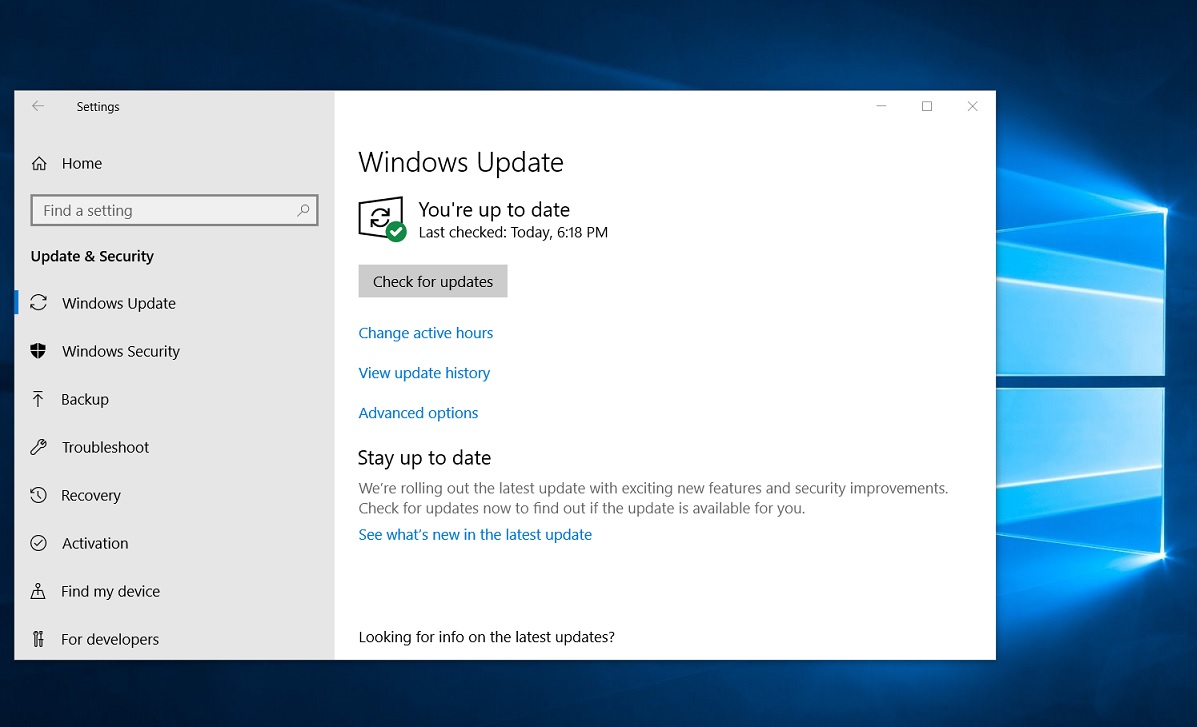
To update your Windows device, click:

If you want to install the update now, select Start  > Settings  > date & Security  > Windows Update , and then select Check for updates. If updates are available, install them.If updates are available, you can choose to install them.

Check for Windows Updates

Updating Apple Devices

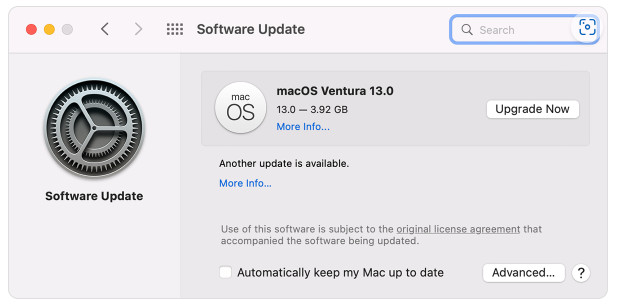
For Apple devices, it’s equally easy. Visit Settings > General > Software Update. When an update is available, hit “Download and Install.” Turn on “Automatic Updates” to receive future armour without lifting a finger.

Updating Mac OS

Safekeeping Business Devices

In the business realm, there a number of proactive measures that can be taken to armour your devices and prevent cyber assaults. Schedule and automate updates to ensure consistency and minimise risk. Deploy up-to-date antivirus software and train your team to spot and report suspicious activity for added protection.

In a Nutshell

Keeping your device and software up to date is paramount in today’s tech-driven world. Regular updates are your virtual shield, fending off cyber threats and preserving your data’s sanctity. Whether Windows or Apple is your weapon of choice, automated updates make it so easy to stay secure. With our user-friendly guide, staying ahead in the cybersecurity game is simpler than you think.

Like this post?

If you liked this post, sign up to our newsletter to keep informed on other news.


Questions? Reach Out to Us Here & We’ll Call You

  • This field is for validation purposes and should be left unchanged.
  • Stay up-to-date with our latest news, promotions, and tech advice from KeyTech through our monthly email.

Maximising ROI: How Managed IT Services Can Benefit Small Businesses

Maximising ROI: How Managed IT Services Can Benefit Small Businesses

Managed IT services have become increasingly popular among small businesses in recent years, and for good reason. Read on to discover the benefits of outsourcing IT Services to a Managed Service Provider (MSP).

MSPs provide a range of services that can help improve the efficiency and effectiveness of business operations including:

• IT Support and Maintenance
• Cloud Services
• Network Management
• Data Backup and Recovery
• Security
• Compliance

By providing these services, MSPs provide their customers peace of mind and improve their ROI through increased efficiency, reduced costs, and increased overall competitiveness.

Our services will give you peace of mind

Cost savings

Instead of hiring a full-time IT employee, small businesses can outsource their IT needs to an MSP at a fraction of the cost. This can help small businesses keep their overhead costs low and increase their profitability. MSPs can also help small businesses identify and eliminate unnecessary IT expenses, such as software subscriptions or hardware that is no longer needed.

Increased efficiency

Managed IT services can also help small businesses increase their efficiency. MSPs can provide their clients with the latest technology and software, which can help them automate tasks and streamline processes, freeing up small business owners and employees to focus on more important tasks.

A professional MSP service will provide its customers with real-time monitoring and maintenance, which can help avoid downtime and keep operations running smoothly.

Improved security

Small enterprises are often the target of cyber-attacks, and MSPs can help protect them with advanced security solutions, such as firewalls, antivirus software, and intrusion detection systems. MSPs can also assist with compliance and regulatory requirements that small businesses must adhere to.

Please don’t hesitate to reach out if you have any questions about our Managed IT Services.

How to Protect Your Data in the Cloud

How to Protect Your Data in the Cloud

Before the pandemic, many businesses took measured steps to transition to cloud technology. The global pandemic forced many companies to make rapid changes to allow their employees to work from home. Although there were security implications associated with such drastic measures, it has resulted in massive gains in cybersecurity.

The cloud has revolutionised the way businesses store and manage data. Thanks to major vendors investing in top-tier security measures, businesses of all sizes can rely on a high level of protection for their confidential information, along with regular updates as more features are added daily.

Despite the advances in cybersecurity technology, businesses still experience security breaches. Often, these breaches can be avoided when the right policies and configurations are in place.

To ensure your business is adequately protected without breaking the bank, let’s look at a few simple yet effective measures that are included with Microsoft 365.

Microsoft 365

Use Microsoft 365 Business Premium

All Microsoft 365 plans include security features, but Premium provides far more features specifically designed for business environments.

Use Multi-Factor Authentication (MFA)

When every user is authenticated correctly, the risk of security breaches drastically decreases. Furthermore, this powerful security feature can be executed speedily, taking a few minutes per account.

The two most secure MFA methods include the Security key method (which involves using a separate security key that you can insert into a PC or mobile device to authenticate the login) and the use of an authentication app. If you use voice and SMS-based MFA please do so with caution. SMS and Voice MFA do not use encryption, making it easy for hackers to intercept them.

Data Security in the cloud

Admin Account Protection

No user should have admin rights on their primary account because even admins can make mistakes when checking email or casually browsing. Users should only have the access they need for the time they need it. Implement a limited access policy to cut the chances of any violations.

Disable Anonymous Sharing

Anonymous sharing is enabled by default, allowing you to share documents with anyone. Meaning, a document could accidentally get sent to the wrong person. By disabling this feature, you will have more control over where your business data is shared.

SharePoint

Monitor SharePoint for Changes and Access Events

SharePoint is a practical way to keep your team informed. You can receive alerts for suspicious activity and notifications when someone deletes more than five files or copies a large amount of data. This can help prevent data loss accidents as well as malicious acts.

Implement Device Policies and Management

Your workforce may use various devices to carry out tasks. Each device is a potential path into your protected environment, so it is essential to have strong policies in place. You can create policies that require complex passwords and insist that Windows updates are performed promptly. Endpoints are now the most prominent threat, so use the free device protection in your Microsoft Business Premium subscription to boost security.

Block Client Forwarding Rules

Enabling email forwarding might breach your workplace policies and also put your business at risk. Suppose a hacker managed to gain access to an account, they could forward emails to an address of their choice, allowing them access to leak sensitive business information and wreak havoc.

The importance of online data security

Data Loss Prevention (DLP) Policies

In Microsoft 365 Business Premium, you can designate rules around your data, such as restricting certain document types from being emailed. You can use these rules to prevent sensitive information, such as credit cards, Medicare, and licence numbers, from being emailed, cutting a critical risk. If your business must share sensitive data, we recommend uploading documents to a secure file storage platform such as OneDrive or Google Drive and then generating a secure link to share with relevant individuals/teams.

Improve Your Microsoft Secure Score

Microsoft 365 includes a handy tool that evaluates your security posture and provides a score based on system configurations, user behaviour, and other measurements. In addition, the tool offers you a prioritised list of recommendations to support you in raising your security level.

Backup Your Cloud Data

A common misconception is that someone, somewhere, is backing everything up for you in the cloud, but that isn’t entirely true. Understand what your data loss acceptance level looks like and find a data backup solution you are satisfied with.

The best online data security protection is prevention through training

Training

Regarding cybersecurity, it is no surprise that human error is the most common cause of security breaches. Regardless of all the possible precautions you take to minimise the risk of cybercrime, all it can take is a link click, download, missed update or misconfiguration to lead to a big problem.

The best way to avoid human error is to enforce cyber security guidelines and provide online and in-person training and testing.

Testing should include a targeted phishing campaign to see who clicks – this can help you to identify who requires training.

As part of any cyber security audit, we look at physical security; you’d be surprised how many people still put their password on a post-it note by their monitor and how many visitors are left unsupervised around sensitive information!

Most of the actions in this post require little or no help to set up and will immediately reduce your risk of a breach. While it is worth investing in a cyber security review and the assistance of a data security specialist, there is plenty that you can do yourself to become less of a target to hackers.

Please don’t hesitate to reach out if you have any questions about data protection.

Contact Us

  • This field is for validation purposes and should be left unchanged.