
Facebook
How Much Could a Cyberattack Cost Your Business?of

How Much Could a Cyberattack Cost Your Business?of

Exploring the Modern Threat Landscape

The rising tide of cybercrime, coupled with the evolving tactics of cybercriminals and the borderless nature of digital transactions, is making it increasingly difficult to gauge the overall economic impact of cybercrime.

In the Annual Cyber Threat Report from July 2021 – June 2022, the Australian Cyber Security Centre (ACSC) saw:

  • an increase in financial losses due to Business Email Compromise (BEC) alone! The cost was over $98 million, which averaged a loss of $64,000 per report!
  • a rise in the average cost per cybercrime report to over $39,000 for small business, $88,000 for medium business, and over $62,000 for large business. An average increase of 14 per cent.
  • A 25 per cent increase in the number of publicly reported software vulnerabilities (Common Vulnerabilities and Exposures – CVEs) worldwide.
  • 150,000 to 200,000 Small Office/Home Office routers in Australian homes and small businesses vulnerable to compromise.
ACTR-2021-2022-Figure-4 Cyber crimes per business size

Navigating Cybersecurity Challenges

The potential risks associated with cyber-attacks on businesses have never been more evident. The advancement of technology has brought unprecedented opportunities, yet it also comes with vulnerabilities that everyone, including businesses must be acutely aware of. Understanding the potential financial implications of a cyber-attack is vital for safeguarding your company and ensuring its continued success.

Understanding Varied Cyber Threats

In the realm of cyber attacks, there are various types of threats that business owners need to understand. These encompass:

  • Spam or Phishing Attacks: Deceptive communication aiming to extract sensitive information or trigger malicious interactions.
  • Denial-of-Service (DoS) Attacks: Purposeful attempts to overwhelm online platforms, causing service disruptions.
  • Virus or Malware Infections: Infiltration of malicious software compromising data and system functionality.
  • Intellectual Property (IP) Theft: Unauthorised access to or distribution of proprietary business information.
  • Hacking: Intrusion into computer systems with unauthorised intentions, potentially using the company’s identity.

Hacking remains a significant apprehension, with cybercriminals masquerading as legitimate entities to acquire private data. Maintaining vigilance is crucial, even when situations appear genuine.

Proactive Measures for Defence

While you can’t eliminate all risks, you can take proactive steps to defend yourself:

  • Regular Updates: Keep software and systems current.
  • Strong Passwords: Utilise robust authentication credentials.
  • Additional Security Layers: Implement heightened security protocols.
  • Collaborate with Experts: Partner with trusted IT/Cybersecurity specialists.

Assessing the Fallout: Post-Cyberattack Consequences

A cyberattack’s aftermath can be severe, especially in interconnected systems. Outdated infrastructure and weak security exacerbate the impact. Beyond immediate costs, such as ransoms, repercussions encompass reputational damage, legal entanglements, and business disruptions. Distrust from customers and potential lawsuits amplify the financial toll.

Bolstering Business Defence: Strategies for Security

To counteract cyber perils, adopt these essential practices:

  1. Professional IT Support: Even small businesses benefit from robust IT services to deter hackers and mitigate long-term costs.
  2. Cyber Insurance Consideration: Explore cyber insurance options to provide coverage against hacker-induced disruptions.
  3. Vulnerability Awareness: Identify weaknesses and remain vigilant, employing cautious online behavior to prevent cyber threats.

Dealing with the Costs: What a Cyberattack Can Mean

Cyberattacks wield substantial financial consequences, particularly for smaller businesses. Recovery demands time, while monetary losses and compromised trust inflict lasting harm. Active defence through robust cybersecurity and cautious practices proves paramount.

A Call to Proactive Defence

Reflect on the potential costs of a cyberattack on your business. The impact can be particularly detrimental for smaller enterprises. Reducing such risks requires immediate action—prioritise robust cybersecurity and cautious conduct to ensure your business’s resilience and prosperity in our interconnected digital landscape.

Like this post?

If you liked this post, sign up to our newsletter to keep informed on other news.


Questions? Reach Out to Us Here & We’ll Call You

  • This field is for validation purposes and should be left unchanged.
  • Stay up-to-date with our latest news, promotions, and tech advice from KeyTech through our monthly email.

7 Compelling Reasons Why Your Business Needs a Disaster Recovery Plan for Data Security

7 Compelling Reasons Why Your Business Needs a Disaster Recovery Plan for Data Security

In today’s digital age, businesses heavily rely on their data, making it a valuable asset critical for their operations. Whether it’s customer information, financial records, or proprietary data, safeguarding this information is essential for business continuity and success. While many businesses assume their built-in data protection measures are enough, having a comprehensive disaster recovery plan is crucial. In this article, we will explore the top reasons why your business should have a robust disaster recovery plan for data security, regardless of the platform you use.

Data loss

Protection Against Data Loss

Data loss can result from a myriad of scenarios, including hardware failures, human errors, cyberattacks, and natural disasters. Having a disaster recovery plan ensures that your data is regularly backed up, reducing the risk of losing critical information and maintaining business continuity.
Regulations and Compliance

Compliance and Legal Obligations

Several industries have strict regulations that mandate businesses to maintain copies of their data. A well-designed disaster recovery plan helps your business stay compliant with these regulations, safeguarding you from potential legal consequences and reputational damage.
business Continuity

Business Continuity and Resilience

Disruptions to business operations can occur unexpectedly, hindering productivity and profitability. A disaster recovery plan helps your business recover quickly from these setbacks, minimising downtime, and ensuring your organisation remains resilient in the face of challenges.
Facilitating Data Recovery

Efficient Data Recovery

In the event of data loss, a disaster recovery plan allows for swift data recovery. Instead of starting from scratch, you can restore critical information efficiently, reducing downtime and minimising the impact on daily operations.
saving money

Cost Savings

Recreating lost data from scratch can be time-consuming and costly. A well-executed disaster recovery plan saves your business from incurring excessive expenses, such as expensive data recovery services or ransom payments to cybercriminals.

Peace of Mind

Peace of Mind and Reduced Stress

Knowing that your data is secure and recoverable offers peace of mind to business owners and employees. The fear of losing valuable information diminishes, allowing your team to focus on driving productivity and innovation.
Enhancing Productivity

Enhanced Productivity and Growth

By having a disaster recovery plan in place, your business can prioritise core activities rather than worrying about potential data loss. This streamlined focus on productivity fosters growth and enables your organisation to seize new opportunities.

In today’s data-centric business landscape, a disaster recovery plan is not just a precautionary measure but a necessity for long-term success. Regardless of the platform you use, protecting your data against loss is paramount. From safeguarding against data loss and complying with regulations to promoting business continuity and enhancing productivity, a robust disaster recovery plan provides numerous benefits.

Don’t wait for a data disaster to strike before taking action. Implementing a disaster recovery plan is an investment in the future of your business. It ensures that your valuable data remains secure and recoverable, even in the face of unexpected challenges.

So, take proactive steps now to protect your business from data loss and ensure its resilience and growth in the dynamic digital world. Safeguard your data, safeguard your business.

Like this post?

If you liked this post, sign up to our newsletter to keep informed on other news.


Questions? Reach Out to Us Here & We’ll Call You

  • This field is for validation purposes and should be left unchanged.
  • Stay up-to-date with our latest news, promotions, and tech advice from KeyTech through our monthly email.

Microsoft’s Bing Chat Enterprise

Microsoft’s Bing Chat Enterprise

An AI Solution Ensuring Data Protection

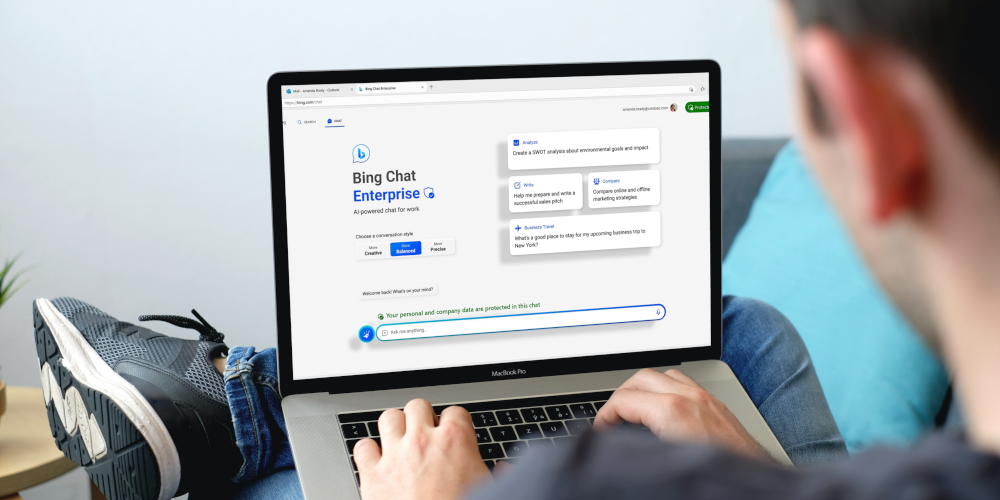
As the use of AI tools increase in businesses, data privacy and security have also emerged as critical concerns. Companies are cautious about using generative AI tools due to the risk of confidential information leaks. This week Microsoft introduced a preview of Bing Chat Enterprise, a revolutionary AI-powered chat tool that prioritises data protection. This article explores Bing Chat Enterprise’s features and its ability to address data privacy concerns associated with AI.

Bing Logo

Enhanced Data Protection for Businesses

Recently launched in preview mode, Bing Chat Enterprise will be available in selected Microsoft 365 plans at no extra cost. Designed for companies hesitant about generative AI, it ensures users’ chat data is not saved or used for AI model training. This protection sets it apart from OpenAI’s ChatGPT as well as other AI tools including the AI powered Bing which utilise user prompts for training unless they opt out.

Bing Logo

Eliminating Fear of Data Leaks

Bing Chat Enterprise alleviates concerns about accidental sharing of confidential information. Its secure service prevents potential leaks, complemented by manual and automated reviews that monitor inappropriate behaviour, ensuring ethical business communication.
Bing Logo

Built on Trustworthy Technology

Microsoft confirmed to The Telegraph that Microsoft cannot view your company data, adding that the service offers “commercial data protection.” Bing Chat Enterprise utilises OpenAI’s GPT-4 model with both automated and manual reviews, ensuring proprietary and confidential data remains protected.
Bing Logo

Microsoft's Commitment to Privacy and Security

Microsoft’s launch of Bing Chat Enterprise reflects its dedication to developing AI-powered tools with the utmost privacy and security for businesses. The tool’s introduction indicates a growing demand for AI solutions in the business world, with data protection at the forefront.
Bing Logo

A Glimpse into the Future of AI-Powered Tools

Bing Chat Enterprise offers more than data protection; it provides a glimpse into the future of AI-powered tools. To foster trust between businesses and AI developers, addressing privacy and security concerns becomes paramount as AI tools become more widespread. Bing Chat Enterprise is a promising opportunity for businesses seeking secure AI solutions for communication needs, without the fear of data leaks.
Bing Logo

Insights from an interview between Yusuf Mehdi and Fox Business

In an interview with Fox Business, Yusuf Mehdi revealed that Bing Chat Enterprise unlocks AI for everyone in the workplace, prioritising data protection. Additionally, Microsoft’s M365 Co-Pilot aims to facilitate real-time meeting summaries and seamless integration with Teams & PowerPoint, expanding AI use cases in workplaces.

Microsoft’s Bing Chat Enterprise marks a groundbreaking step in AI-powered tools for businesses. By ensuring data privacy and security, this chat tool empowers companies to leverage AI confidently. With Bing Chat Enterprise, millions of users can harness AI’s potential in various use cases, fostering a new era of AI-powered collaboration and productivity. As AI becomes an integral part of the workplace, Microsoft sets a positive example for the industry by prioritising data protection.

Like this post?

If you liked this post, sign up to our newsletter to keep informed on other news.


Questions? Reach Out to Us Here & We’ll Call You

  • This field is for validation purposes and should be left unchanged.
  • Stay up-to-date with our latest news, promotions, and tech advice from KeyTech through our monthly email.

Why Password Managers Reign Supreme Over Browser Storage

Why Password Managers Reign Supreme Over Browser Storage

Passwords are crucial for safeguarding our digital information and privacy. With the increasing number of websites, apps, and platforms, it is nearly impossible to remember all our passwords. While web browsers offer password storage, it is essential to explore a safer and more efficient alternative: password managers. In this article, we will delve into the advantages of using a password manager over-relying on your browser’s password-saving feature.

Enhanced Security

Ensuring the security of your passwords is paramount. Password managers provide robust security measures, such as encryption, to protect your login credentials from hackers. By generating complex and unique passwords for each account, password managers add an extra layer of protection, reducing the risk of password-related vulnerabilities.

Unmatched Convenience

Compared to browser-based password storage, password managers offer unparalleled convenience. With autofill capabilities, password managers save you time by automatically filling in your login information accurately. This feature minimises user errors and streamlines the login process.

Seamless Multi-Device Synchronisation

A notable advantage of password managers is their ability to synchronise across multiple devices. Whether you are using your mobile device, desktop, or any other web-enabled gadget, you can effortlessly access your passwords. This feature is especially valuable for individuals on the go or those who rely on several devices.

Efficient Password Organisation

Password managers excel at organising your passwords, allowing you to sort them into various categories like work, personal, or bank accounts. This organisational system makes it easy to locate specific passwords without the hassle of scrolling through an extensive list.

User-Friendly Experience

Using a password manager simplifies the process of creating and storing passwords. It eliminates the need to manually generate and remember new passwords or retrieve forgotten ones. Additionally, password managers boast intuitive interfaces, making it a breeze to add new logins and navigate the application.

In conclusion, adopting the use of a password manager is an excellent way to enhance online security. With their superior security features and convenient functionalities, password managers surpass the capabilities of browser-based solutions.

Like this post?

If you liked this post, sign up to our newsletter to keep informed on other news.

Request a Call Back

  • This field is for validation purposes and should be left unchanged.
  • Stay up-to-date with our latest news, promotions, and tech advice from KeyTech through our monthly email.

Password Management

Ensure the security of your critical information and privileged credentials by utilising powerfully designed solutions to prevent data breaches and defend against potential threats.

$5 + GST per User / Month* *A standard setup fee of $199 + GST. Setup includes portal and user setup and 1 hour of remote training via Teams. Importing user and company passwords must be done by the user, or, additional import fees will apply.
Why It’s Time to Switch to Passphrases Instead of One-Password Approach

Why It’s Time to Switch to Passphrases Instead of One-Password Approach

In today’s digital landscape, ensuring robust online security is crucial. With cyber threats becoming increasingly sophisticated, relying on a single password is inadequate to safeguard your accounts. It’s time to embrace passphrases as a more resilient and memorable alternative. This article explores the limitations of traditional passwords and highlights why passphrases are the superior choice for enhancing online security.

The Limitations of Traditional Passwords

Traditional passwords have various shortcomings that make them vulnerable to cyber-attacks. They are usually short, simple, and predictable, which makes them easy targets for criminals who employ brute-force or dictionary attacks to crack passwords. Also, users frequently reuse passwords across multiple accounts, which increases the risk of security breaches.
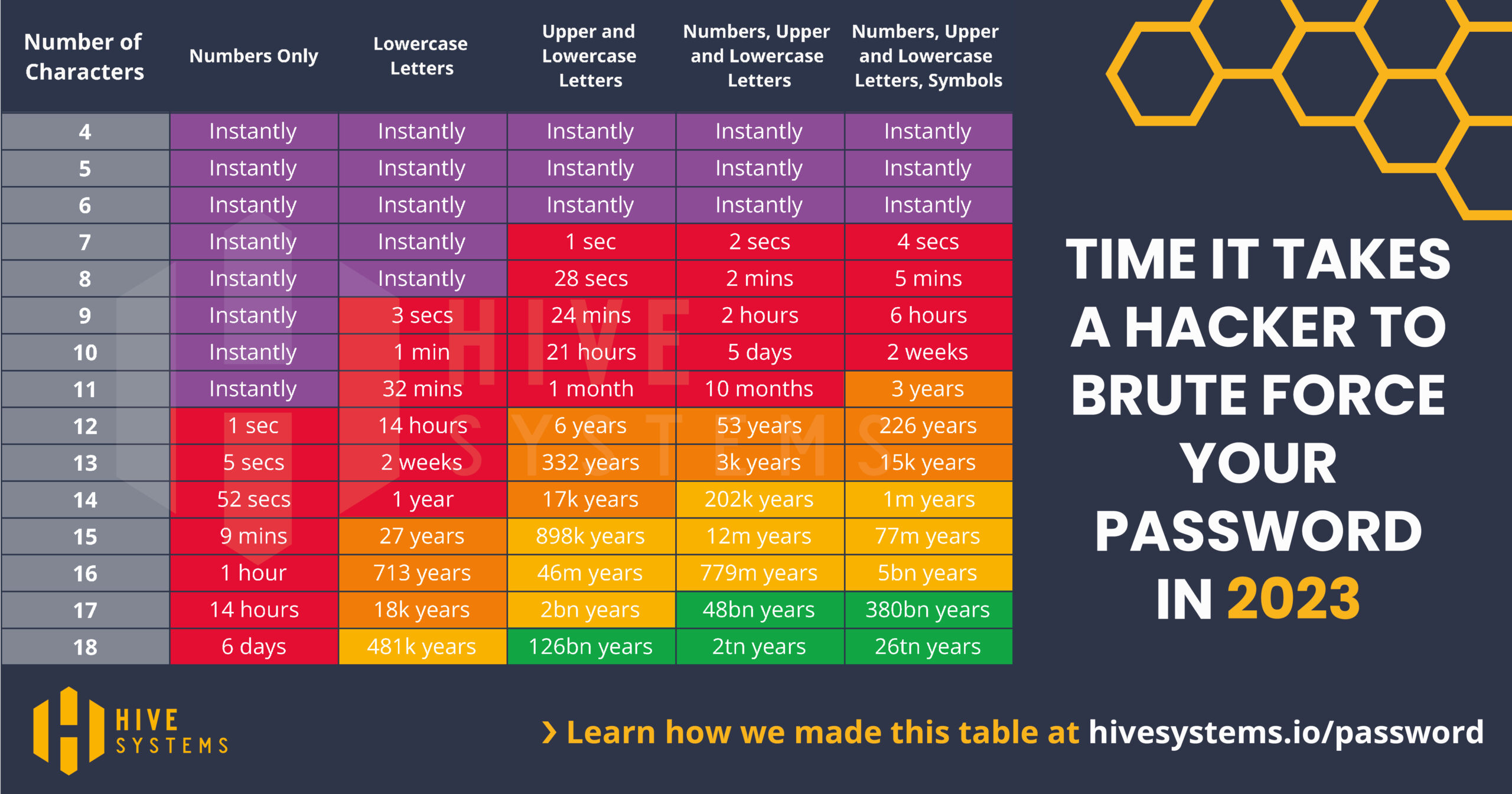
time it takes to brute force passwords in 2023

With cyber threats becoming increasingly sophisticated, relying on a single password is inadequate to safeguard your accounts. The image above shows how quickly a password can be cracked based on the amount and combination of characters.

Passphrases address these limitations and offer enhanced security:

1. Length and Complexity

Passphrases, composed of four or more random words, provide greater length and complexity. This significantly increases the time and effort required for brute-force attacks to crack them. A longer passphrase with a mix of upper and lower case letters further strengthens its security profile.

2. Ease of Memorisation

Passphrases are easier to remember compared to complex passwords. By using real words instead of arbitrary combinations, users can recall passphrases more naturally. The longer length of passphrases facilitates memorable narratives, making user authentication feel less like a chore than with traditional passwords.

3. Increased Resistance to Dictionary Attacks

Passphrases that utilise random word combinations from various sources make it challenging for attackers to crack them using precomputed dictionaries of commonly used passwords. Crafting a passphrase with diverse and unrelated words effectively boosts resistance against dictionary attacks.

4. Compatibility with Multi-Factor Authentication (MFA)

Passphrases are compatible with MFA, which adds an extra layer of security through additional steps like one-time codes, fingerprint authentication, or security questions.

Best Practices for Creating Strong Passphrases

Follow these guidelines to create secure and memorable passphrases:
1. Length is critical: Aim for passphrases exceeding 14 characters, incorporating four or more random words.
2. Unpredictability: Select unrelated words to ensure resistance against dictionary attacks.
3. Personalisation: Customise passphrases for each account by adding unique modifiers or context-specific words. This practice isolates the impact of a compromised passphrase to a single account.

In conclusion, it is crucial to adapt our security practices accordingly. Traditional passwords are no longer sufficient to protect our online accounts. By embracing passphrases, users can create strong and memorable authentication credentials. Passphrases offer increased complexity, better resistance to attacks, and compatibility with additional security measures like MFA. It’s time to transition from relying on a single password to embracing passphrases for enhanced online security and the protection of valuable digital assets.

Like this post?

If you liked this post, sign up to our newsletter to keep informed on other news.

Discover our comprehensive range of security services and expert advice tailored specifically for businesses. From online security and cyber security to document, account, and website security – we’ve got you covered. Stay protected with our trusted solutions.

Understanding Your Cybersecurity Score: Why It Matters and How to Improve It

Understanding Your Cybersecurity Score: Why It Matters and How to Improve It

If you’re running a business, it’s important to be aware of your cybersecurity score. This score measures how well your business is protected against cyber threats and attacks. A low cybersecurity score can leave your business vulnerable to data breaches, hacking, and other malicious activities that can have serious consequences for your operations, finances, and reputation.

Cybercriminals are constantly finding new ways to exploit vulnerabilities in networks, devices, and software, which can have serious consequences for businesses of all sizes. One way to assess your business’s readiness to withstand these threats is to calculate your cybersecurity score.

What is a Cybersecurity Score?

A cybersecurity score is a measure of your business’s security posture. It considers various factors, such as your network configuration, software patching, password policies, and employee training, to provide an overall assessment of your security readiness. The score is typically expressed as a numerical value, which can range from 0 to 100, with higher scores indicating stronger security.

Why does it matter?

A cybersecurity score can help you understand how well you are protecting your business from cyber threats. It can also give you a benchmark for comparison against other businesses in your industry or size category. Additionally, some customers and partners may require you to provide a cybersecurity score as part of their due diligence process, so having a good score can help you win new business.

How to improve your cybersecurity score?

Improving your cybersecurity score requires a comprehensive approach that addresses all aspects of your security posture. Here are some steps you can take to improve your score:

Conduct a security audit

A security audit can help you identify weaknesses in your network, devices, and software. You can then use the audit results to develop a prioritised plan for remediation.

Implement security best practices

There are many best practices you can follow to improve your security, such as using strong passwords, implementing multi-factor authentication, encrypting sensitive data, and restricting access to critical systems.

Invest in security tools and services

There are many security tools and services available that can help you detect and respond to threats, such as firewalls, antivirus software, intrusion detection systems, and data management systems. It’s essential to ensure that any software your business uses is properly licensed and updated to maintain its security and effectiveness.

Train your employees

Your employees play a critical role in your security posture, so it’s important to train them on how to identify and avoid common cyber threats, such as phishing and social engineering attacks.

Regularly monitor and update your security practices

Cyber threats are constantly evolving, so it’s important to monitor your security posture regularly and update your security measures as needed.

A cybersecurity score is an important tool for assessing your business’s security posture and identifying areas for improvement. By following best practices, investing in security tools and services, training your employees, and regularly monitoring and updating your security, you can improve your score and better protect your business from cyber threats. Don’t wait until it’s too late – take action now to improve your cybersecurity score and safeguard your operations, customers, and reputation.

Keytech logo icon

At KeyTech, we are committed to helping our customers enhance their cyber security posture by offering a range of comprehensive solutions and expert guidance. Our IT audit service is specifically designed to evaluate your cyber security posture, pinpoint any potential vulnerabilities, and create a tailored plan to implement effective solutions that enhance your security. With our expertise, you can be assured that your business will be better equipped to protect itself from cyber threats and safeguard your valuable data.

Book an IT Audit

Let's explore your business' security requirements together. Complete the form below to arrange your complimentary consultation and receive a quotation for our premium business data security & productivity solutions. With us on board, you can rest assured that your business is in good hands.

  • This field is for validation purposes and should be left unchanged.