IT Support Brisbane: Latest Windows 10 Update Lets You Do More
A lot of the time, from the end-user perspective, windows updates can be a bit of a hassle. Taking time out of your busy schedule to change… something. A lot of the time, however, the computer seems pretty much the same as it was before. Well, this time is a little different if you know what to look for. Here’s an overview from the Key Technologies Brisbane IT support team.
Paste from Cloud Clipboard
Personally, I’ve been waiting for this one for a while. The cloud clipboard allows you to copy and paste text and images between computers. To set it up:
Open Settings
Go to System > Clipboard
Turn on both Clipboard history and Sync across devices
Press CTRL + V to test out the paste
Use emojis from the keyboard
Your favourite emojis from smartphones and social media are moving more and more into the mainstream. In line with this Windows has imported them into their latest Windows 10 release. This makes friendly emails and informal documents a little more fun to write! Simply press Windows + . to use them.
Autosave files as you edit them!
Go to OneDrive > More > Settings. On the AutoSave tab, select Update folders and specify which folders you’d like to automatically sync.
Use the Microsoft UI on Android
If you install the Microsoft Launcher from Google Play, you can have a cool Microsoft style homescreen for your phone.
Customize the mouse pointer
You can now make your pointer bigger or change the colour. Access Windows Settings > Ease of Access > Cursor & pointer.
Make text and other things bigger
Change the text size by going to Settings > Ease of Access > display.
Snip images and take screenshots
The old screenshot keyboard shortcut (Windows + Shift + S) now allows you to snip and copy images and text to the clipboard.
Customize appearance
The new-look light theme allows you to switch between colours. Switch to dark mode to make your apps stand out. Go to Settings > Personalisation > Colours to select your colour mode.
Remove pre-installed apps
Reduce the bloat of your system by removing unused apps such as 3D Viewer, Calculator, Groove Music, Mail, Calendar, Movies & TV, Paint 3D, Snip & Sketch, Sticky Notes, and Voice Recorder. To uninstall go to Settings > Apps.
Pause Updates
Now you have even more control over updates with the ability to pause for up to seven days. To delay updates, go to Settings > Update & Security.
Microsoft has patched a remote code execution vulnerability in it’s Remote Desktop Services (CVE-2019-0708). This vulnerability can be exploited remotely, does not require authentication and can be used to run malicious code on the victim’s computer.
“A remote code execution vulnerability exists in Remote Desktop Services – formerly known as Terminal Services – when an unauthenticated attacker connects to the target system using RDP and sends specially crafted requests. This vulnerability is pre-authentication and requires no user interaction. An attacker who successfully exploited this vulnerability could execute arbitrary code on the target system. An attacker could then install programs; view, change, or delete data; or create new accounts with full user rights.“
The advisory includes fixes for Windows 7 and Windows 2008 (see here) which are included in Microsoft’s patch on Tuesday. Additional patches were released for Windows XP and 2003. A further analysis of the patch has been provided by Sophos.
The flaw is considered high risk and ‘wormable’, meaning it can be used to develop self-replicating malware.
Millions of networks have the RDP protocol exposed to the internet so that their machines can be remotely managed. Sometimes this is purposeful, but sometimes it is the result of an oversight or mistake. In both cases, such networks are vulnerable if the machines are not updated.
Due to the vast number of potential targets and the potential for spreading, we suggest that you expect the patch to be reverse engineered by hackers to make ‘worm’ malware. Thus, you should definitely patch ASAP. For more fixes, jump to what can I do?
Because of the potential impact this can have, Microsoft has released patches for systems outside their mainstream support. Since the end of life for Microsoft XP and 2003, Microsoft has released a number of patches to mitigate the most serious vulnerabilities. This is one of them… Another notable case was during the WannaCry ransomware attacks of 2017.
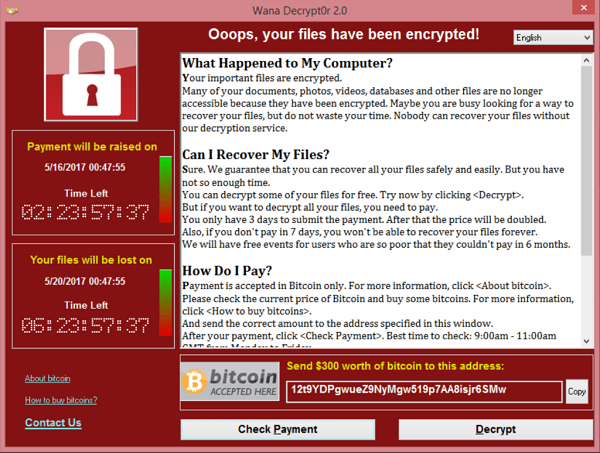
WannaCry was a ransomware attack that affected a huge number of organisations, perhaps most notably the NHS in England. It exploited a flaw in the SMB (Windows Share) protocol and was largely so successful due to the slow rate at which users adopt patches on their systems. You can read more about these attacks in the following articles: Protecting your business from ransomware attacks, and WannaCry Worm causing mayhem.
What to do:
First off, UPDATE! If you can’t update for some reason, you can use these workarounds, or call us to enable them:
1. Enable Network Level Authentication:
This forces a user to authenticate before RDP is exposed to the attacker. Not all affected systems support NLA.
2. Turn of RDP
If RDP isn’t running, the vulnerability can’t be exploited. As obvious as this seems, some organisations are unable to work without RDP, and some are running it without realising it.
3. Block TCP port 3389
Blocking port 3389 (and any other ports you’ve assigned to RDP) at the perimeter will prevent an attack from entering your network but can’t stop an attack from originating inside your network.
IT Support Brisbane | 3 Common Technology Problems and the keys to solving them
It’s no surprise to most of us that small businesses struggle to maintain their IT infrastructure. Though some problems really do require expert intervention to solve, there are some that can be dealt with internally, but rarely do. The following are some of the problems and how to solve them.
Problem 1: Inconsistent or weak email security
Did you know that 92.4% of malware is delivered by email? Not only is it a common vector of attack, but it’s also a successful one too. The same report shows that 30% of those studied open phishing emails, 12% even click the malicious links.
There are two main contributing factors to this issue. As hackers know, email is a very effective way to gain access to your company resources, and many employees aren’t aware of the dangers posed by email or the precautions that should be taken to mitigate them.
Use 2-factor authentication: This is the easiest measure to take. 2-factor authentication hardens your accounts beyond the usual username and password. It works by having users verify their identity in two ways: something they know (e.g. a username and password) and also something they have (generally a smartphone app). This security method has proven invaluable in preventing hacking attacks (e.g. brute-force attacks). Unfortunately, a recent study found that 2FA is not commonly adopted by businesses. There are many different 2FA options out there, generally, you will be provided with a backup method like an SMS, phone call, alternate email, and recovery codes to mitigate the risk of losing your device. This risk seems to be the main reason, along with marginally more effort being put into logging in that holds people back from adopting this, however, you can set up alternate methods so you’re protected, even if you lose your device.
Train employees in email best practices: A good starting point might be to show employees this article along with the basics of recognising phishing attacks. However, as the attacks get more sophisticated, so should your employee’s defences. Monthly memos about phishing attacks can be helpful in making sure your employees are aware of recent attacks and best practices.
Problem 2: Poor IT Vendor Management
According to a Tech Republic Survey, most companies report spending more time managing their IT vendors than two years ago. This is driven largely by a growing interest in cloud computing, SaaS, and cybersecurity services. IT vendor management is imperative to enable you to deliver positive outcomes in IT-related fields and control those services.
For the best outcomes, pick a reliable IT support company and try to stick with the one as much as possible.
Problem 3: Poorly Secured Workstations
Cybersecurity is be a big and important issue. Unfortunately, one area where businesses tend to fall down is in securing their workstations. So what can be done about this?
Employ Strong Passwords: According to an interesting data break down by Verizon. The majority of hacking-related breaches involve a compromised user device. This highlights the importance of securing employees’ work devices with such measures as anti-virus software and group policies. Your thinking about passwords probably also needs to be updated. For instance, did you know that mixing lower and uppercase letters is no longer a good way to ensure password security? The person who came up with that rule actually regrets saying it.
Secure Administrator Privileges: Administrator accounts can be very useful for performing important tasks on a computer network. They can also be very dangerous to give out unnecessarily on a high value network like a company intranet. If regular staff have access to administrator accounts and privileges, they (and your company) are doubly vulnerable to hacking tactics like Social Engineering.
Office 2019 or Office 365? What’s best for your business?
Most businesses have been using Microsoft programs and operating systems for many years now. If anything, we rely on the Microsoft Office suite (Word, Excel, etc.) even more than we did years ago.
In recent years though, Microsoft has added even more products to Office. As a result, businesses now have a choice between the relatively new cloud-based Office 365 and the latest traditional Office version, Microsoft Office 2019. Hence, your business is faced with a choice, Office 365 or Office 2019.
Which one is best for your business? We will go over the benefits of each product respectively and which ones suit your business better.
What is Office 365?
Office 365 is a cloud-based version of the Office suite. Instead of purchasing a license, you pay a subscription (monthly or yearly). Office 365 gives you access to the standard office applications, and in the business version, there are some extra business-focused ones. The 365 suite is designed to offer the applications vital to running a business.
What is Office 2019?
Office 2019 is a stand-alone version of Office. It is a licensed product that charges a single fee for unlimited access. There is also a business version of Office 2019 called “Office Home and Business 2019”. It offers the essentials like Word, Excel, PowerPoint, and Outlook. Your license is only for that version of Office and won’t be valid for the next version.
Benefits of Office 365
Microsoft Office 365 has a lot of helpful features. These one’s are those that are especially helpful for business and set it apart from Office 2019.
Regular Updates: A benefit of paying a subscription rather than a license key for a specific version of a program is that you stay up to date as upgrades and improvements are added. Rather than having to go out an buy a license key for a newer version, the updates are applied to your applications as they come out, meaning you get the best user experience and security available.
Collaboration: Because it’s a cloud-based platform, Office 365 allows multiple users to edit the same document at the same time. You can see the edits in real time so staff members can contribute to the same piece of work at the same time.
Link files to emails: With Office 365 you can link to a file in the cloud instead of having to attach it in your email. This avoids a lot of the issues that can occur with large files and inboxes.
Flexibility: A single Office 365 subscription allows you to access all its applications on multiple devices (up to 5). This means you can access and work on your files whilst on the move. You can also work from home on your own laptop.
Switch between accounts: Using OneDrive, you can switch between your business and personal accounts with ease. This allows you to save storage and separate your personal files from those of the business.
Self-de-cluttering inbox: Office 365 includes a clutter inbox for your OutLook inbox. With this, you can train OutLook to move less important messages you the clutter folder automatically. From there you can either read them later or delete them.
Benefits of Office 2019
Office 365 doesn’t have quite as many features as Office 365, but there are upsides to choosing it.
One-time payment: Although the subscription is the more popular option, there are still benefits of a single payment. Paying the fee once means you will be able to use it for as long as the product exists. It also means you won’t have to continually factor a subscription into your expenses.
Sixty days of support free: When purchasing Office 2019, you get sixty days of free support. This can help you set it up initially, and deal with any problems you have using it.
Upgrades: If you were an Office 2016 user, this edition will surprise you with myriad improvements.
Office 365 vs Office 2019: IT support opinion…
If you’re a small business with only a few employees, then Office 2019 might be your best bet. If you have more employees, Office 365 is a better option.
Office 2019 is one license for one machine. Office 365 offers far more flexibility. If you want to be able to work away from the Office or outside of work hours, then 365 is the go. Even Microsoft thinks you should be using 365. Microsoft’s Office 2019 landing page sells 365 as the better option.
The reason for this is that you can. Office 365 has more applications, more features and more flexibility. Importantly, it makes it far easier to secure and backup your data.
Your staff can be more productive with the ability to work on the same document at the same time from anywhere. No more trying to consolidate 20 different versions of the same spreadsheet.
If you buy Office 2019, that is all you get, it won’t get better, and it will eventually go out of date.
Office 365 is regularly updated meaning your user experience is going to get better and better as time goes on.
Need help choosing? Ask our friendly Brisbane based IT support for advice.
You can call us for advice and for support with Office 365 or 2019 by Clicking here.
Protect yourself and your business from Ransomware
In large companies, there’s usually an IT or cybersecurity department that advises them on what technology and software to install, how to maintain it, and what the best practices are for preventing vulnerability to threats such as cybercrime. However, if you’re a small business, you may not have a dedicated IT department or cybersecurity analyst to take on such a role. In a number of small businesses the proprieter is the resident IT guy (or girl), as well as CEO, treasuser, marketer and so on…
With this in mind, it’s not surprising that cybersecurity operations to prevent such attacks as ransomware commonly get put on the backburner or “later pile”. In today’s world however, this is quite a serious threat to ignore. As such this article outlines some basic steps you can take to reduce the threat posed to your organisation.
In 2016-17 there were 47,000 cybersecurity incidents in Australia. This figure was up 15% from the previous year according to the Australian Federal Government’s Cybersecurity Centre, and it gets even more grim. Cybercrime is expected to continue to rise and predicted to cost in excess of US$6 trillion annualy worldwide (Cybersecurity Ventures, 2017).
It is estimated there will be a ransomware attack on businesses every 14 seconds by the end of 2019, up from every 40 seconds in 2016 (Cybersecurity Ventures, 2019). Ransomware is among the most prevalent cybercrime threats in Australia and generally starts with a spear phishing attack (KnowBe4, 2019). An example of spear phishing is when attackers target a person, generally an unsuspecting employee with a malicious email that when opened or when a link is clicked, allows the attacker to infect the businesses network. This may freeze all operations and render vulnerable devices unusable except for correspondence with the attacker for ransom.
In a recent case, when the owner and manager of a small group of pharmacies in Western Sydney was away on holiday’s, an employee opened an email and clicked an innocent looking link. With that single mouse click, the ransomware was deployed on the company network causing the computers to freeze. Given that this was a pharmacy, company employees couldn’t access medical or pharmaceutical information to determine the needs of their customers, nor could they enter prescription details. In fact, they weren’t even able to access information on medications that employees often had to look up to convey accurate information to their customers. Add to this that no electronic payments could be processed, and it is clear that it was a very costly mouse click.
The pharmacist returned from vacation and was met with pandemonium. The only working program (apart from ransomware) was email, and it displayed an ominous message demanding thousands of dollars worth of cryptocurrency to restore all data and systems. The pharmacist called his IT support service for assistance, but sadly their was nothing they could do. Their advice was to pay up and hope the attack does what they say they will.
Ransomware attacks are devastating and can cause severe damage to the finances and reputations of affected businesses. Luckily, there are some steps you can take to protect your business from attacks of this type.
Keep all software up to date.
Almost all cyber attacks target out of date software. In the case of the wave of WannaCry ransomware attacks in 2017 that affected computer systems in 150 countries, there had been a fix available before the attack. Microsoft had released a patch for the WannaCry vulnerability weeks earlier.
The positive spin on this is that people who were diligent with their software updates weren’t infected. A good way for businesses to stay on top of this is to configure computers to install software updates as they become available. This can even be enforced for PCs on a domain or Network with a Group Policy Object or Network Access Control.
Install Antivirus Software
Antivirus software is invaluable and absolutely necessary for preventing attacks such as ransomware. As long as it is kept up to date, it can detect and prevent known malware from infecting your computers. That being said, don’t start thinking antivirus can stop everything. They are helpful, but not magic. They can prevent malware that matches malware definitions in their databases. To put it simply, it won’t stop what it hasn’t seen before. For this reason, you should do more than just install antivirus software.
Back up your files
This is possibly the best defence specifically for ransomware. Ransomware attacks only work if the target doesn’t properly back up their files. Nobody is going to pay a steep ransom to avoid the minor annoyance of having to restore their systems from recent backups. Thus if you back up your data properly and securely, cybercriminals can’t hold it for ransom effectively.
For security, consider backing up your files on a drive that is not connected to the main business network, or on a secure cloud storage solution. It’s best to have multiple backups in separate locations, to minimize the risk of data loss; even from other threats like hard drive failures and natural disasters.
Outline and prepare your reporting process
Under new laws that came into effect in February, the Australian government now requires all businesses with a turnover of over $3 million to report any and all data breaches that would seriously harm people. The notifiable data breach legislation means business businesses can potentially face multi-million dollar fines for failing to report hacking attacks and breaches of private data. Hence, you should read up on the Legislation and have a plan in place for reporting data breaches and attacks.
Be suspicious of unsolicited emails
Be very cautious of any unsolicited emails, popup windows and dubious websites that could potentially carry malware. To manage these risks, you can install a site security rating addon for Firefox and an email client that blocks remote content by default. Neither of these tools will be able to help you, however, if you click on a link that you do not trust. Whether it be in an email, a website, just don’t click it, and train your employees to do the same.
Keep up to date with the cybersecurity threat landscape
Not everyone has the time to become a cybersecurity guru, but you can keep an eye out and pay special attention when you hear about the next cybersecurity threat. Keep an eye on news about cybersecurity threats so that you can avoid being a victim of new attacks and other emerging threats.
Consider cyber insurance
While it may be best to avoid a ransomware attack altogether, even well prepared companies can fall prey as cybercriminals develop new attacks and strategies. In the event that a cybersecurity incident occurs, a cyber insurance policy can help you mitigate the impact on your business. Cyber insurance can cover the loss of profit due to a cyber incident and the costs associated with recovering. Not only can it reimburse you for the payment of a ransom or costs of negotiating with those making an extortion threat – it can also cover the financial consequences of losing a customer, employee or commercially sensitive data (such as that required to be reported under the Federal Government’s new NDB scheme).
Office 365 has gained quite a lot of popularity of late, with small and large businesses coming to know the benefits of using a cloud based platform to drive simplified collaborative work at a straightforward cost.
A trend that started in fortune 500 companies is now being picked up by smaller startups and has now been adopted by approximately 80% fortune 500s. This is because a cloud based, constantly evolving software suite is well placed to meet most companies unique and ever changing needs.
Office 365 migrations offer myriad business advantages
For any business, an Office 365 migration is a momentous occasion. Not only will your IT staff breathe a sigh of relief, but your business will reap the benefits of new tools, rolling no-stress updates, and bolstered productivity with routines and workflows. In sum, productivity and effectiveness will skyrocket.
Although the most commonly cited benefit of migrating to Office 365 is the substantial cost reductions, the advantages go far beyond that. Case and point, here are 5 reasons below!
1) Certainty in costs
No nasty surprises for your carefully planned budget. What you see is what you get.
With a fixed rate, subscription plans for Office 365 allow certainty in software expenses that is otherwise hard to come by. This is incredibly important when planning your budget and business operations expenses. On a related note, Microsoft manages Office 365 upgrades and additional functions, so you needn’t worry about expensive migration projects that were once the norm for an enterprise level microsoft customer.
Fortunately, once all is said and done you can compare the respective prices of Office 365 and your current software suite by analysing your past spendings on microsoft products and management. From this you can easily compare what the flat rate would be for Office 365 over that period. Disclaimer, you may be annoyed you didn’t migrate sooner.
2) Synchonise business operations and collaboration across locations
In today’s global economy and interconnected world, it is becoming more and more common place for employees, contractors and others to work together from different locations. Without an appropriate cloud based software suite, businesses in such positions are left with the options of expanding their current on the premises IT infrastructure of build additional data centers in order to support collaborative work between additional locations. Globalisation can certainly entail some headaches for IT professionals.
Enter, Office 365…
Scaling your business up or down over multiple locations becomes a simple matter with a cloud based software suite. According to your requirements, you can adjust the number of licenses you need for Office 365 without the logistical issues usually associated with such expansion.
3) Improve inter- and intra-organisational communication
Not only can physical separation cause headaches for traditional on the premises software suites, inter-departmental and project separation can severely affect the cohesiveness and efficiency of strategic business unit operations. Sadly, separation between departments and strategic business units can often diminish communication which in-turn makes overall business objectives less likely to be achieved.
Such worries are a figment of the past with Office 365’s collaboration and communication functionalities. The suite features such as Exchange Online, Yammer, Office Groups, SharePoint Online, Skype for Business, OneDrive for Business and more! You can utilise that to streamline communication and cultivate collaboration, whereby staff can seamlessly share ideas and files between departments, projects, devices and locations.
4) Boost productivity
All the previous benefits add up to one very important objective. That is, to stramline business operations and make every second of work more productive! But Office 365 isn’t just about helping you get stuff done faster. It’s purpose is to reinvent how you do it!
In a globally interconnected world where productivity is key. It is imperative to have your familiar offoce applications on a range of devices that you can have, wherever you are. Whether you catch up with work whilst waiting for a friend, work on a project with a coffee catch-up with a colleague, use your morning commute or a conference call with a client for maximum efficiency, Office 365 will help you make it happen.
5) Supercharge IT operations
If you work in IT then you’ll probably know the pain involved in expanding and maintaining an on the premises Office suite. The layers upon layers of technical requirements, unmet dependencies, and other moving parts, there’s a whole lot of opportunities for things to go wrong. Implementing one update can trigger a domino effect of linked upgrades and incompatibilities occur. Migrating to Office 365 takes the stress out of keeping software up to date, and speeds up IT operations. Leaving Microsoft Office configuration to Microsoft means you can turn your attention to other important tasks that you may need to do.
So call KeyTech today, and wait for all this to be set up!