
Facebook
Embracing the AI Revolution: Unlocking a New Era of Commerce

Embracing the AI Revolution: Unlocking a New Era of Commerce

The rapid advancement of Artificial Intelligence (AI) technology is ushering in an era of change and disruption within the world of commerce. This cutting-edge technology presents countless opportunities for organisations to enhance their operations and make more informed decisions, all while streamlining customer experience. As a result, business leaders around the world are starting to view AI as a crucial component of their future success. Our post delves into the myriad benefits of implementing AI technology, and how embracing this digital revolution can catapult organisations to greater heights.

Customer experience

Understanding the basics of AI in commerce

Artificial Intelligence (AI) refers to the development of computer systems that can perform tasks that would typically require human intelligence, such as visual perception, speech recognition, decision-making, and language translation. In the context of commerce, AI can be used to enhance various aspects of the user experience, such as search functionality, personalisation, customer service, and order fulfilment. This allows businesses to efficiently cater to the unique needs and preferences of their customers, resulting in higher levels of satisfaction and loyalty.

AI advantage – improving efficiency and decision making.

One of the core benefits of integrating AI technology into a business is the potential to significantly improve operational efficiency. By automating repetitive and time-consuming tasks, companies can allocate their resources more effectively and focus on more strategic initiatives. In addition, AI-powered analytics tools can provide a wealth of actionable insights, enabling smarter decisions based on data, rather than relying solely on intuition or outdated methods.

improved efficiency and decision making

Enhancing customer experience

The rapid evolution of technology and the digital landscape has led to a significant shift in customer expectations. Today’s shoppers demand personalised experiences, instant support, and seamless transactions. Implementing AI technology in areas such as chatbots, virtual assistants, and recommendation engines allows businesses to meet and exceed these expectations, fostering stronger relationships with their clients and boosting conversion rates.

Revolutionising the Workplace: AI Technologies for Business Process Automation

Revamping marketing and sales strategies

AI-powered marketing and sales tools are proving to be game changers in the world of commerce. With the ability to analyse vast amounts of data, these tools allow businesses to identify trends and patterns that can inform their marketing and sales strategies. By leveraging AI, companies can better understand their target audience, create more targeted campaigns, and generate a higher return on investment. Moreover, AI technology can also optimise pricing and promotions to maximise revenue and profitability.

Addressing potential challenges

While the benefits of AI-powered commerce are undeniable, it is essential for businesses to address any potential challenges that may arise. Ethical concerns surrounding data privacy and ensuring fair and unbiased algorithms are among the top priorities. By being transparent about how they utilise AI and diligently addressing any potential roadblocks or vulnerabilities, companies can build trust among stakeholders and ensure that the exciting prospects of AI technology are leveraged responsibly.

New Era of Commerce

There’s no denying that AI is radically changing the landscape of commerce and presents unparalleled opportunities to streamline business operations, deliver exceptional customer experiences, and drive revenue growth. As AI-powered technologies become more robust and accessible, businesses of all sizes should embrace this digital revolution to stay ahead of their competitors and unlock the full potential of what AI-enhanced commerce has to offer. By understanding the benefits, addressing potential challenges, and integrating AI across various functions, businesses can undoubtedly step into an exciting new era of commerce.

Discover the awe-inspiring world of AI as it revolutionises eCommerce capabilities

– Experience truly personalised shopping journeys with AI-powered product recommendations that understand your unique behaviour patterns.
– Watch in amazement as AI-powered merchandising dynamically updates product content for the ultimate conversion optimisation.
– Unleash your creativity with AI-powered content creation that seamlessly combines modules, crafts captivating copy, and even captures mesmerizing videos using drones!
– Effortlessly find your desired items with AI-powered site and product search that navigates through massive product catalogues with utmost precision.
– Get ready for the future of AI-powered fulfilment that adjusts strategies based on real-time factors like weather and shipping to ensure your deliveries are always on point.

Revolutionising Business with AI: Boosting Productivity for Hybrid and Office Workforces

Revolutionising Business with AI: Boosting Productivity for Hybrid and Office Workforces

In today’s fast-paced and increasingly competitive business landscape, the quest for efficiency and productivity is taking centre stage. Companies are continuously searching for innovative ways to enhance the work experience of their employees while minimising costs. Artificial Intelligence (AI) technology, which has emerged as a game changer in automating business processes and streamlining workflows, both in the office and in a hybrid working model. In this post, we’ll explore some revolutionary AI technologies that have proven to save time and money, making staff more productive and ready for the future of work.

virtual attendant

1. AI-powered Virtual Assistants

Virtual assistants like Google Assistant, Siri, and Amazon Alexa have already made their way into our daily lives. Now, AI-powered virtual assistants are revolutionising the workplace—empowering users to manage their tasks, meetings, and priorities more effectively. These virtual workplace assistants can schedule meetings, remind staff of deadlines or appointments, and even help draft emails. By managing tasks on an employee’s behalf, AI-powered virtual assistants save time, increase productivity, and improve the employee experience.

Intelligent Document Processing

2. Intelligent Document Processing

AI-driven optical character recognition (OCR) technology can now automate the process of scanning, extracting, and digitising information contained in documents. This speeds up operations by reducing the need for manual data entry and streamlining the handling of critical information. Additionally, natural language processing (NLP) technology can analyse text data and identify essential elements like dates, names, or specific phrases. By automating these processes, employees can allocate their time to more valuable tasks and reduce human errors.

Robotic Process Automation (RPA)

3. Robotic Process Automation (RPA)

RPA leverages AI technology to automate repetitive and monotonous tasks traditionally handled by humans. RPA not only reduces the time spent on these tasks, but it also increases accuracy and efficiency. Furthermore, RPA can be applied to various departments, including human resources, procurement, and accounting, enabling staff to focus on strategy, decision making, and innovation.

AI Customer Support

4. AI-driven Customer Support

Customer support is a vital aspect of any business. By employing an AI-powered chatbot, businesses can offer instant support and problem-solving capabilities to their customers. Chatbots can handle routine queries and troubleshoot common issues, reducing the workload of customer service staff and enabling them to focus on more complex inquiries. Furthermore, since chatbots are available 24/7, customers can get assistance at any time, improving overall customer satisfaction.

AI-based Workforce Analytics and Management

5. AI-based Workforce Analytics and Management

Understanding employee behaviour and performance is crucial for optimising productivity. AI-driven workforce analytics tools can identify patterns and trends in employee work habits or performance, providing invaluable insights for managers. This information can be used to devise targeted training programs or incentive schemes, improving employee engagement and performance. Additionally, AI-powered scheduling and resource management tools can help managers assign tasks, track progress, and balance workloads more effectively in a hybrid working environment.

Artificial Intelligence technologies have proven to be key enablers in transforming workplaces and automating a wide range of business processes. By adopting AI-powered solutions, businesses can save time and money while enhancing employee productivity, both in the office and in a hybrid working paradigm. The AI revolution is here, and it is up to us to harness its potential and empower our organisations for a more efficient, cost-effective, and streamlined future.

7 Must-Know Reasons Why Your Business Needs to Backup Microsoft 365 Data

7 Must-Know Reasons Why Your Business Needs to Backup Microsoft 365 Data

In today’s fast-paced digital world, your business data is the lifeblood of your business. Microsoft 365 (M365) is a powerful platform that provides a centralised location to store, manage and access this data, but relying solely on its built-in data protection features is not enough.

When it comes to data backup, many businesses make the mistake of assuming that Microsoft 365’s built-in data protection features are enough. However, relying solely on these features is not enough. Microsoft 365’s data protection is designed to provide basic protection against accidental deletion or corruption, but it does not provide comprehensive protection against all types of data loss scenarios. This is why it’s critical to have a robust backup strategy in place, one that covers all your bases and provides you with peace of mind.

Next, we explore 7 critical reasons why your business can’t afford to ignore Microsoft 365 data backup.

Data loss

Protection Against Data Loss

Backing up data your data is the best way to protect against accidental deletion, corruption or loss due to unforeseen events like software failures, hardware crashes or cyberattacks.

Regulations and Compliance

To Meet Regulatory Compliance and Standards

Certain industries have strict regulations that require businesses to maintain copies of their data. Businesses should backup data to ensure they meet their regulatory requirements, avoid legal or financial penalties and protect their reputation.

business Continuity

Securing Business Continuity

Disasters, outages, and cyberattacks can disrupt business operations, but having a robust backup plan in place can help organisations recover quickly and keep the business running, minimising downtime, and reducing the impact on the organisation and its customers.

Facilitating Data Recovery

Facilitating Data Recovery

In the event of data loss, having a backup allows organisations to quickly recover and restore their data much faster and more efficiently than recreating it from scratch. Being able to restore data reduces downtime and minimises business disruptions.

Saving Time

Saving Time and Money

Restoring data from a backup is typically faster and less expensive than recreating it from scratch. Additionally, by having a reliable backup system in place, businesses can avoid the costly expenses associated with paying a ransom to hackers in the event of a cyber-attack. This saves money and eliminates the need to negotiate with perpetrators and the risk of permanent data loss, which can be a lengthy and stressful process.

Peace of Mind

Providing Peace of Mind

Knowing that data is backed up gives organisations peace of mind, reducing the stress and anxiety associated with the possibility of data loss.

Enhancing Productivity

Enhancing Productivity

Implementing a reliable backup and recovery plan allows organisations to focus on their core business activities, rather than worrying about data loss. This can enhance productivity, improve efficiency and drive growth.

In conclusion, backing up your Microsoft 365 data and tenancy is a crucial aspect of protecting your business from data loss. From preventing data loss and meeting compliance requirements to enhancing productivity and providing peace of mind, a robust backup strategy is essential for any modern business. Don’t wait until it’s too late – take action today to ensure that your business is protected from data loss.

Like this post?

If you liked this post, sign up to our newsletter to keep informed on other news.

Maximising ROI: How Managed IT Services Can Benefit Small Businesses

Maximising ROI: How Managed IT Services Can Benefit Small Businesses

Managed IT services have become increasingly popular among small businesses in recent years, and for good reason. Read on to discover the benefits of outsourcing IT Services to a Managed Service Provider (MSP).

MSPs provide a range of services that can help improve the efficiency and effectiveness of business operations including:

• IT Support and Maintenance
• Cloud Services
• Network Management
• Data Backup and Recovery
• Security
• Compliance

By providing these services, MSPs provide their customers peace of mind and improve their ROI through increased efficiency, reduced costs, and increased overall competitiveness.

Our services will give you peace of mind

Cost savings

Instead of hiring a full-time IT employee, small businesses can outsource their IT needs to an MSP at a fraction of the cost. This can help small businesses keep their overhead costs low and increase their profitability. MSPs can also help small businesses identify and eliminate unnecessary IT expenses, such as software subscriptions or hardware that is no longer needed.

Increased efficiency

Managed IT services can also help small businesses increase their efficiency. MSPs can provide their clients with the latest technology and software, which can help them automate tasks and streamline processes, freeing up small business owners and employees to focus on more important tasks.

A professional MSP service will provide its customers with real-time monitoring and maintenance, which can help avoid downtime and keep operations running smoothly.

Improved security

Small enterprises are often the target of cyber-attacks, and MSPs can help protect them with advanced security solutions, such as firewalls, antivirus software, and intrusion detection systems. MSPs can also assist with compliance and regulatory requirements that small businesses must adhere to.

Please don’t hesitate to reach out if you have any questions about our Managed IT Services.

Service Enquiry

Have a question about our services? Reach out and we will contact you shortly.

"*" indicates required fields

Microsoft 365 app to replace Office.com

Microsoft 365 app to replace Office.com

A recent post on the Microsoft 365 Admin Center indicates that the new Microsoft 365 web app has started rolling out last week, and that the Windows and mobile apps will follow in January 2023.

Watch the short video below for a sneak peek of the Microsoft 365 app desktop interface.

The Microsoft 365 app is thoughtfully designed to help users be more productive by managing all their documents, notes and media in one place. In addition, the app allows them to create content like a pro and work seamlessly across devices.
The Microsoft 365 app will be free to install from the Microsoft website and the Apple and Google Play stores but requires an active Microsoft 365 subscription. Once the app installation is complete, users are prompted to sign in with their Microsoft 365 account.
After signing in on the desktop app, users will see their email, calendar, files, and contacts in one place. The app also promises features such as task management and the ability to share documents with other users.
The Microsoft 365 app is an excellent way for users to stay organised and productive. Email, calendar, files, and contacts will be in one place, allowing easy access to the information needed without switching between different apps or screens. The task management and document-sharing features are also beneficial for those who need to collaborate with others on projects or tasks.

The Microsoft 365 app will automatically replace the existing Microsoft Office web experience and will bring some new features to its users. The rebranding of Office.com is only the first change users will notice.
Some of the most notable new features include tagging support, a feed tab and a new apps module.

  • Tagging support will help users classify documents with custom tags.
  • The feed tab feature will surface meetings, shared files and trending content within your organisation.
  • A new apps module will provide a unified interface to access productivity apps from Microsoft and third-party providers.
The Microsoft 365 app will become a great tool for increasing productivity. Users can use the app on the web or install the app on desktop and mobile devices. The app aims to provide a unified experience across Microsoft 365 apps, including Outlook, OneDrive and Teams. Overall, the Microsoft 365 app will become a valuable asset for individuals and businesses, helping them to increase their productivity and organise their work-life more efficiently.

Like this post?

If you liked this post, sign up to our newsletter to keep informed on other news.
Microsoft 365
We can help answer your Microsoft 365 questions. Feel free to reach out to our team over the phone or complete the form below.

Request a Call Back

  • This field is for validation purposes and should be left unchanged.
  • Stay up-to-date with our latest news, promotions, and tech advice from KeyTech through our monthly email.

The Incredible Power of Microsoft Teams Admin Center

The Incredible Power of Microsoft Teams Admin Center

Management Tools within Microsoft Teams Admin Center

If you are a Global or Teams administrator, you will find the Teams Admin Center to be a valuable tool for managing your business. With the full administration capabilities, you can manage and monitor users, apps and devices in one place!Microsoft Teams Admin Center gives you the tools to enforce team-wide and organisation-wide security, compliance and privacy through policies such as two-factor authentication, single sign-on through Active Directory and data encryption.

Team Member & User Management

  • Create, edit, search and archive teams (groups) within your business
  • Set teams as public or private
  • Add or remove team, members and owners
  • Add or remove channels to the group
  • Change team and group settings (including conversation settings, channels settings and classifications)

Manage Policies

Policies carry out a range of duties within an organisation. Teams Admin Center allows administrators to permit and restrict user settings on various areas such as messaging, meetings and applications. For example, administrators can allow users to schedule meetings in a teams channel, enabling users to edit sent messages, and control whether users pin apps to the Teams app bar.

Administrators can assign policies to individual users, users with certain roles, and groups within the company using Microsoft Teams Admin Center or via Powershell.

App policies can be configured witrh custom apps installed and pinned to the Teams app bar for your team.

Transcriptions, cloud recordings and IP audio/video configurations can be setup for meeting policies in Teams.

Administrators can view policy assignments in an Activity log and manage them within the Policy Packages section of Teams Admin Center.

Users within your company can send any feedback regarding Microsoft Teams from any Microsoft Teams app, whether it is the web, desktop or mobile app.

Microsoft Teams Admin Center Meetings

Manage Devices

When you purchase devices that support remote provisioning, you can configure, update, restart and monitor the device diagnostics within the Microsoft Teams Admin Center. Similar to configuring user and group policies, profiles can be created and assigned to an individual device or a group of devices.

Security, Compliance and Privacy

When you purchase devices that support remote provisioning, you can configure, update, restart and monitor the device diagnostics within the Microsoft Teams Admin Center. Similar to configuring user and group policies, profiles can be created and assigned to an individual device or a group of devices.

Microsoft delivers advanced security and compliance capabilities to their applications. Security features such as two-factor authentication, single sign-on through Active Directory and data encryption in transit and at rest.

Customers of Microsoft 365 own and have complete control of their data. Microsoft doesn’t have access to uploaded content and customer data stays within the tenant. Microsoft won’t use their client data for anything other than providing you with the service you subscribed to. Visit the Microsoft Trust Center for more information.

Industries & Government

Microsoft has built a set of resources to guide and assist administrators to get the most out of Teams. There are resources for the following organisation types:

  • Education
  • Frontline Workers
  • Government
  • Healthcare
  • Nonprofit
  • Retail

Ask us for a demo

Ask us for a demo of the Microsoft Teams Admin app so you can see this helpful tool in action. Take advantage of its powerful features to streamline your operations and keep track of all Microsoft 365 apps and settings in one place.

Start exploring the app to discover the convenience of managing Microsoft 365 from the new Microsoft 365 Admin app.

So why not download the app today and see how it can benefit your business?

Download the Microsoft 365 Admin App | Microsoft 365

Ask us for a demo of the Microsoft Teams Admin app so you can see this helpful tool in action. Take advantage of its powerful features to streamline your operations and keep track of all Microsoft 365 apps and settings in one place.

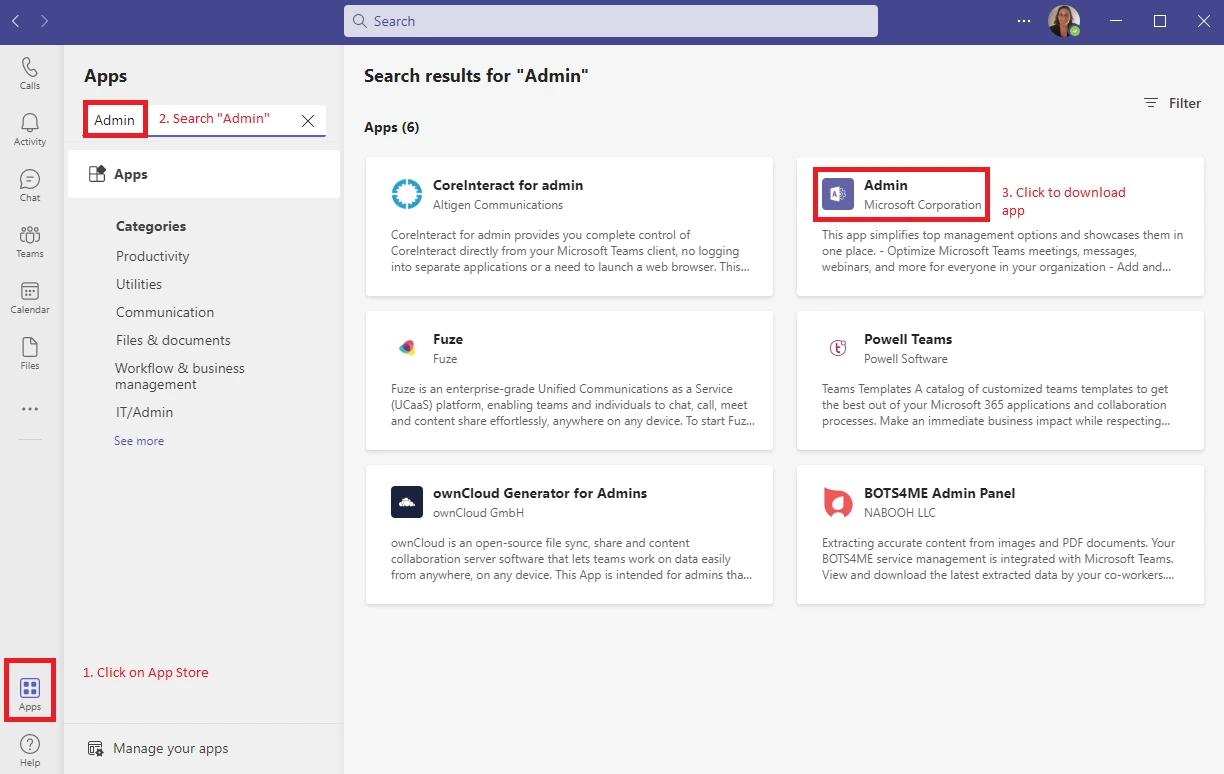
Downloading the Admin app in Teams

How to Download the Admin app in Microsoft Teams

You will need administrative rights to use it, although the Admin app is available for all users in the App Store.

To experience the new Admin app, visit the Microsoft Teams app store. Type “Admin” in the search field to find and download the app in Microsoft Teams.

Microsoft continues to refine their newest app to make its Teams collaboration platform ideal for hybrid work. The company recently added chat bubbles support on iOS & Android as well as live captions and transcriptions in the web version of their platform and enabled users to embed Teams chat within Dynamics 365.

We are happy to help! Phone 1300 755 615